Official site
Granola - AI notepad for back-to-back meetings
Explore features & plans ↗Affiliate link: Fieldnotes earns a commission if you purchase through this link.
Granola, Otter and Fathom compared on free plans, pricing, bot-free capture, playback, languages and privacy. Find the right AI note taker for your work.
Fathom is the best free option, Otter has the lowest standard annual list price among these three, and Granola is the best fit when you want no meeting bot and no retained audio. That is the practical answer to Granola vs Otter vs Fathom in 2026. The right AI note taker depends on whether you value unlimited free recording, live transcription and playback, or data minimization.
The old bot-versus-no-bot shortcut no longer works. Otter shipped bot-free desktop capture in October 2025, and Fathom added a bot-free mode on April 15, 2026. All three can now take notes without a visible participant joining, but their default workflows, free-plan limits, playback options and data handling still differ.
Choose by the job you need the app to do, then check the limits that come with that choice.
| Decision | Granola | Otter.ai | Fathom |
|---|---|---|---|
| Best fit | Bot-free notes with no stored audio | Live transcription, playback and the lowest standard annual list price | Unlimited free recording and transcription |
| Free-plan catch | Only the last 30 days of notes stay available in the app | 300 minutes a month and 30 minutes per conversation | Five advanced summaries a month; several AI actions require paid plans |
| Recording playback | No | Yes | Yes, with clips and playlists |
| Language coverage | 31 on desktop, 17 on mobile | Six | 38 |
This is a research-based comparison, not a hands-on transcription accuracy test. The findings are tied to 27 linked sources, led by each vendor's pricing, help, security and privacy pages. Key pricing and bot-free details were rechecked on September 13, 2026. Legal claims use named reporting and law-firm analysis, and allegations are identified as allegations.
Granola's design has not moved: it captures your microphone and your computer's audio output, so there is nothing for other people to see in the participant list. The homepage puts it plainly, saying it uses your computer audio so it doesn't invite a bot. Because it works at the device level rather than joining a call, it covers Zoom, Meet, Teams and anything else, including a conversation happening across a table from you.
What changed is the other two. Otter's desktop app and Chrome extension have captured meetings without the Notetaker bot since October 7, 2025, and since August 6, 2026, the desktop app can start recording automatically when it detects microphone activity. Fathom added a bot-free mode on April 15, 2026, though it is still a Mac-only beta; Windows users are on the bot for now.
So the split in 2026 is not bot versus no bot. It is what you trade away:
Granola is an AI note taking app rather than a recorder. You type sparse notes during the call and it fills them out afterwards using the transcript. It runs on macOS, Windows, iOS, Android and Apple Watch, and it raised a $125M Series C at a $1.5B valuation in March 2026, with Vanta, Gusto, Asana and Cursor named as customers.
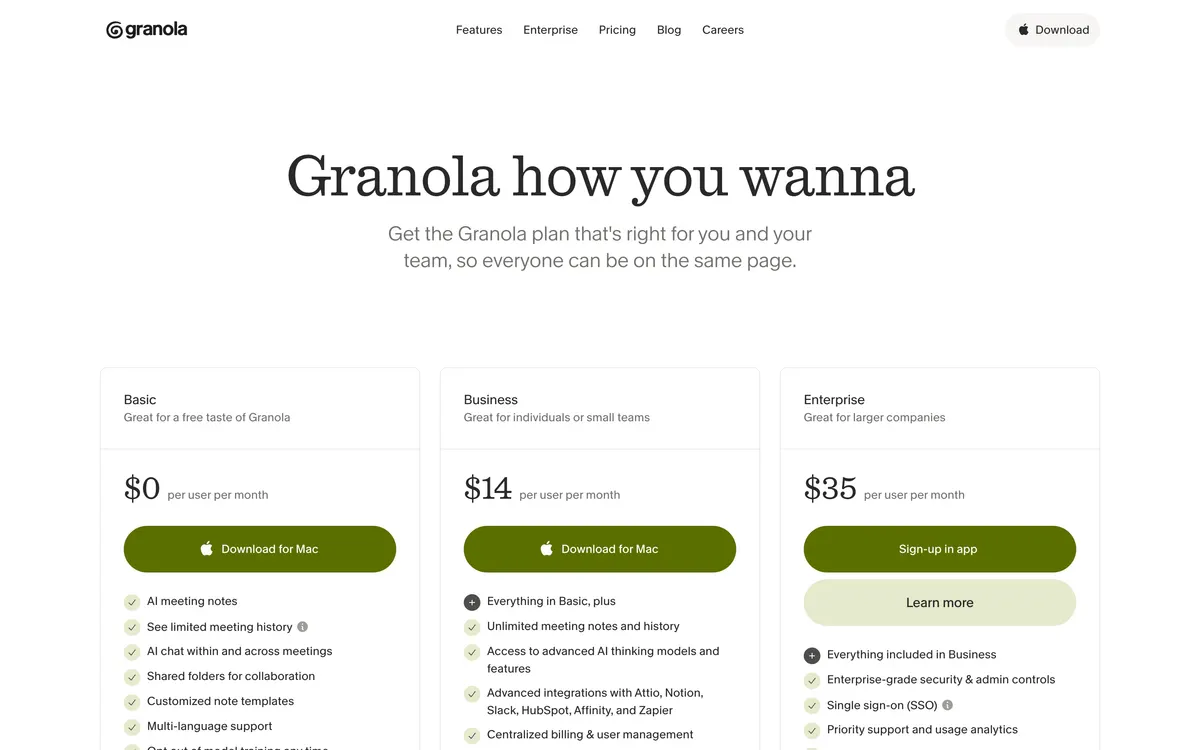
Granola's plans on September 9, 2026. Note there is no annual discount for Business - annual billing is Enterprise-only
The security page is unusually specific about what is not retained. Granola states that it does not store meeting audio, transcribing in real time on desktop and from temporarily cached audio on mobile, and its privacy policy says recordings are not retained once the transcription is created. Notes live in a US-hosted AWS VPC, encrypted in transit and at rest, and the company has been audited to SOC 2 Type 2. Granola says it is not currently HIPAA compliant, cannot sign a BAA, and should not be used to store or process Protected Health Information.
Pricing is straightforward and slightly awkward. Basic is free. Business is $14 per user a month. Enterprise starts at $35 per user a month. There is no published annual discount for Business, so over twelve months Granola Business costs $168 while Otter Pro on annual billing costs $99.96. The free plan has no meeting cap and no daily transcription limit, but your notes are only available in the app for the last 30 days, and integrations are limited to Slack. That 30-day window is the single line most Granola vs Otter comparisons miss, and it is not on the pricing page - it is in the billing help doc.
One more limit worth knowing before you commit: Salesforce is not a native integration, so Granola routes that workflow through Zapier.
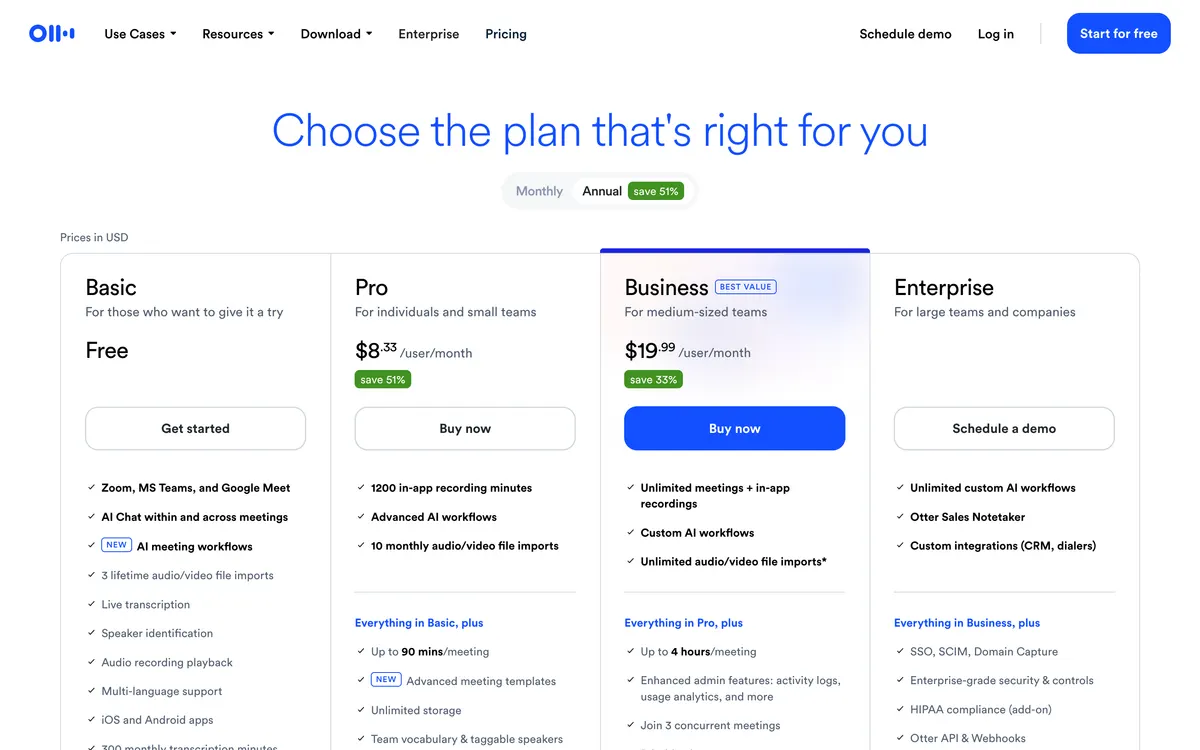
Otter's pricing page. Pro is $8.33 a month on annual billing, the lowest standard annual list price among these three
Otter is the oldest and most sales-oriented of the three. Pro lists at $16.99 a month, or $8.33 billed annually. Business lists at $30 a month, or $19.99 annually, though the page is currently showing $24 with a promotion good for three months. Enterprise is custom, adds a HIPAA add-on with a BAA, turns model training off by default, and requires a 100-user minimum for SSO, which puts it out of reach for most mid-market teams.
The free tier is where Otter falls behind. You get 300 minutes per user per month with no rollover, a 30-minute cap per conversation, only your 25 most recent conversations, three file imports for the lifetime of the user, five workspace members and 20 AI chat queries a month. A week of real meetings will exhaust it.
Two things Otter does better than either rival. First, sales tooling: native Salesforce sync by tier, and Live Assist for in-call coaching, which neither Granola nor Fathom matches, though Live Assist is Enterprise-only. Second, honesty about accuracy - Otter's own documentation says it generally reaches 85 to 90 percent accuracy, which is notably lower than the 95 percent figure that circulates in third-party roundups. Neither Granola nor Fathom publishes a number at all.
The weak spot nobody mentions is language coverage. Otter supports six languages, two of them still in beta, and one language per meeting with no reprocessing afterwards. If your calls are not in English, this alone decides it.
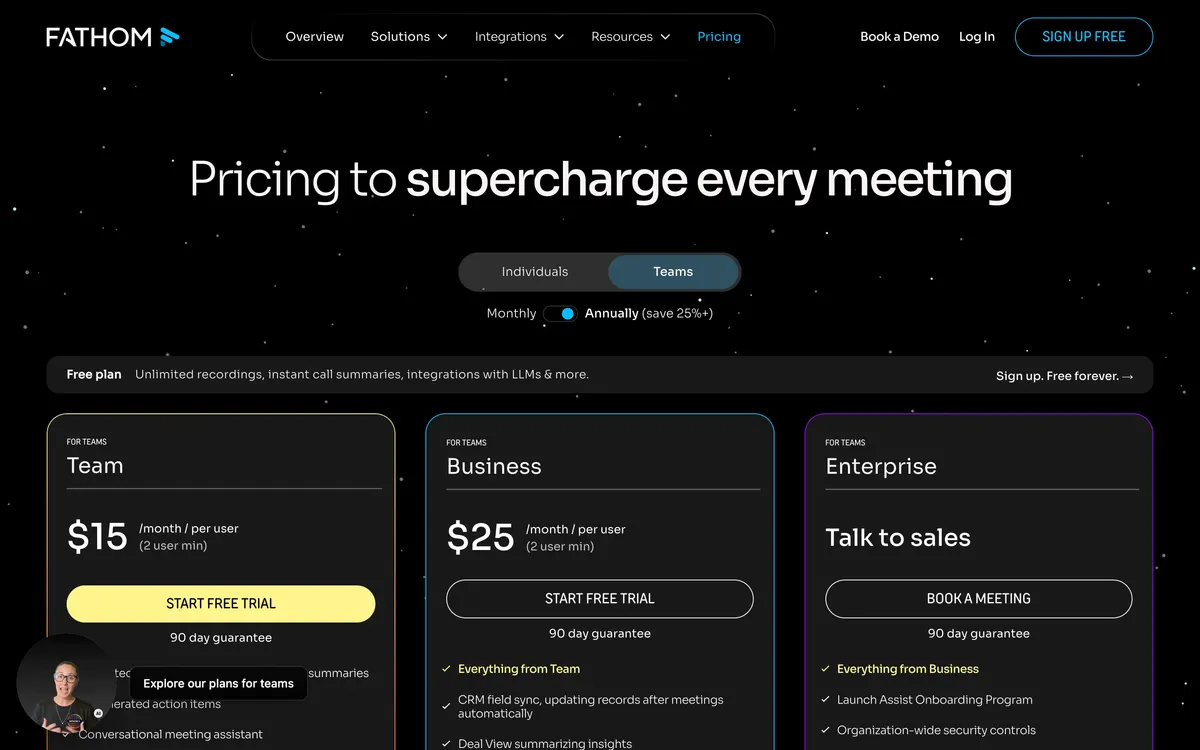
Fathom's plans. Team at $15 a month annually costs less per seat than Premium at $16, with a two-seat minimum
Fathom's free plan gives you unlimited recordings and storage, unlimited transcription in 38 languages, clips, playlists, search across calls, and CRM sync to HubSpot, Salesforce or Close for up to three users per domain. The caps are on the AI side: five advanced summaries a month, after which you get the general template, and no AI action items, no follow-up emails and no Ask Fathom, which are Premium features. New accounts get a preview of the Premium features that ends 30 days after sign-up, so judge the free plan on what is left in week five. For a solo consultant that is still often the whole job done for nothing.
Paid plans are Premium at $20 a month ($16 annually), Team at $19 ($15 annually, two-seat minimum) and Business at $34 ($25 annually, two-seat minimum). Yes, Team is cheaper per seat than Premium, which is odd but real. Business adds CRM field write-back, Deal View, coaching metrics and AI scorecards, which makes it the strongest sales package on paper, and the cheapest of the three at that capability level.
Fathom also has the clearest consent posture, with caveats worth knowing. It sends consent emails 24 hours before scheduled meetings, and it states plainly that there is no way to silently record, on both the bot and bot-free modes. But it does not send those emails for same-day meetings, impromptu calls and Slack huddles do not trigger them at all, and if nobody replies Fathom joins and captures the call as normal. It is also the only one of the three that publishes HIPAA compliance, with a blanket BAA.
The gaps: there is no mobile app at all, so Fathom cannot capture an in-person meeting, and the bot-free mode is Mac-only and still in beta.
| Free plan | Granola Basic | Otter Basic | Fathom Free |
|---|---|---|---|
| Transcription | No stated limit | 300 minutes per user a month, no rollover | Unlimited, 38 languages |
| Per-meeting cap | None stated | 30 minutes | None stated |
| History | Last 30 days in the app | 25 most recent conversations | Unlimited storage |
| AI summaries | Enhanced notes included | Summaries with action items | 5 advanced a month |
| Ask AI | Across all meetings | 20 queries a month | Paid plans only |
| Recording and playback | None, no audio kept | Yes | Yes, clips and playlists |
| Speaker labels | Meet and Zoom only | Yes | Yes |
| Integrations | Slack only | Zoom, Teams, Meet, MCP | CRM sync up to 3 users |
| In-person capture | Yes, mobile apps | Yes | No mobile app |
| Paid plans | Granola | Otter.ai | Fathom |
|---|---|---|---|
| Entry paid plan | Business $14 a month | Pro $16.99, or $8.33 annual | Premium $20, or $16 annual |
| Team plan | None | Business $30, or $19.99 annual | Team $15 annual, 2 seat minimum |
| Upper plan | Enterprise from $35 | Enterprise custom | Business $25 annual |
| Annual discount | Enterprise only | Up to 51 percent off | 25 percent or more off |
| 12 months, one seat | $168 | $99.96 | $192 |
| Languages | 31 desktop, 17 mobile | 6, two in beta | 38 |
| Native Salesforce | Zapier only | Yes | Yes |
| HIPAA | No - not currently HIPAA compliant | Enterprise add-on | Blanket BAA |
| Audio retained | Never | Yes | Yes |
Over a year and per seat, the lowest standard annual list price among these three is Otter Pro at $99.96. Granola Business is $168 because there is no annual option below Enterprise. Fathom Team is $180 a seat a year, and it has a two-seat minimum, so the smallest Fathom Team purchase is $360.
This is the section most comparisons skip.
All three train their own models on your conversations by default. Granola states that it trains on anonymized data and that you can opt out in Settings; its privacy policy adds that de-identified and aggregated data used in AI models may be retained indefinitely. Fathom trains on de-identified data by default, with a per-user opt-out and an org-wide one for Team accounts. Otter also trains on de-identified data by default and turns that off by default only on Enterprise; what its sharing toggle covers is not spelled out on any official page, so treat the opt-out scope there as unknown. What all three do is contractually bar the major model vendors from training on your data - Granola names OpenAI and Anthropic, Fathom names OpenAI, Anthropic and Google. So on the training question, nobody here is meaningfully more private than the others.
Where they genuinely differ is retention. Granola keeps no audio at all, which means there is no recording to leak, subpoena or accidentally share. Otter and Fathom both keep recordings. If your worry is a recording surfacing later, that difference is real and it favors Granola.
Two of the three are in court, for opposite-looking reasons. A putative class action, Chamberlain v. Granola, was filed on July 30, 2026 in the Northern District of California, with wiretapping and intrusion claims that turn on other participants not knowing the tool is there. The Otter case is the mirror image: the complaint says OtterPilot auto-joins scheduled calls as a visible participant and that Otter never obtains consent from the other attendees. On August 13, 2026, a judge let the federal wiretap, California CIPA and Illinois biometric claims proceed while dismissing others, and the reasoning is the part that should worry every vendor here: the court held Otter is plausibly a third-party eavesdropper rather than an invited participant because it independently retains and uses the recordings for its own commercial purposes, meaning model training. That attaches to the business model, not to the bot, and Granola and Fathom both train in-house models on de-identified customer data by default. Otter denies that any interception occurred and says it acts as a tool for the meeting host. No court has found any of these vendors liable, no class has been certified, and every claim above is an allegation.
The concrete harm case on record involves the bot, not the bot-free mode. In September 2024, Otter auto-joined a confidential hepatology rounds meeting at an Ontario hospital through a former physician's calendar access and distributed the transcript, exposing health information for seven patients; Ontario's privacy commissioner issued findings citing two critical security gaps on the hospital's side, personal email use and a departed physician still holding calendar access. It is also worth knowing that since August 6, 2026, Otter's desktop app can start recording automatically when it hears microphone activity, which is bot-free and automatic at the same time.
The practical takeaway is the same regardless of which you pick: tell people they are being transcribed. Granola's help center says to always get consent and to check with your legal team, Fathom recommends consulting a lawyer and builds consent emails into the flow, and Otter's terms put the responsibility for notice and consent on the account holder.
Choose Granola when the deciding requirement is no stored audio, local bot-free capture or in-person recording from a phone. Choose Otter when you need live captions, speaker-labelled playback, searchable recordings or the lowest standard annual list price among these three. Since Otter now supports bot-free desktop capture too, this decision is about what happens during and after the meeting rather than whether a bot is technically available.
Choose Fathom when you want unlimited free recordings, transcription and storage, or when clips and CRM sync matter. Choose Granola when you want no recording file to exist, need mobile capture for an in-person conversation, or use Windows and want bot-free capture now. Fathom's bot-free mode remains a Mac-only beta.
Choose Fathom for the strongest free allowance: unlimited recording and transcription with five advanced summaries a month. Choose Otter when live transcription, a searchable archive, Salesforce-oriented workflows or the $8.33 annual paid entry matter more. Otter's free plan is much tighter, so frequent meetings usually push it into a paid comparison.
Start with Fathom Free. Unlimited recording, transcription and storage plus free CRM sync is more than most independents need, and five advanced summaries a month covers the calls that matter. Choose Granola instead if you want nothing joining your calls, if you are on Windows, if you need to capture in-person conversations on your phone, or if you work in a language Otter and Fathom handle poorly.
Fathom Business at $25 a user annually is the strongest package for the money: CRM field write-back, Deal View, coaching metrics and scorecards. Go with Otter if your stack is Salesforce-first, keeping in mind that its Live Assist in-call coaching is Enterprise-only, as is the API, and SSO needs a 100-user minimum. Granola is the weakest fit here, with no native Salesforce, no recordings to review and speaker labels that often just say Them.
Do not assume the answer is the bot-free one. Granola has the best data-minimization story because it retains no audio, but it is not currently HIPAA compliant, cannot sign a BAA, and trains on your data by default on the free and Business plans. Fathom is the more defensible choice for a regulated organization that needs a signed BAA: it publishes HIPAA compliance with a blanket BAA and offers bot-free capture on Mac. Fathom still retains recordings, so bot-free does not mean transcript-only. Its consent emails also skip same-day and impromptu meetings, so notice is not automatic everywhere. Otter Enterprise turns training off by default and offers a HIPAA add-on but carries the most adverse legal record so far.
Fathom at 38 languages or Granola at 31 on desktop. Otter's six languages, two of them in beta, will not survive contact with a multilingual team.
Fathom's bot-free mode is Mac-only, and Fathom has no mobile app, so it cannot record a meeting in a room. For either of those, Granola or Otter.
That is what the documentation says. Granola transcribes in real time on macOS and Windows and from temporarily cached audio on mobile, and states that recordings are not retained once the transcription is created, with no way to access audio from your meetings. The trade-off is that you can never go back and listen.
Technically the bot-free modes are invisible to other participants. Legally that is exactly the question two active US lawsuits are about, and recording law varies by state and country. Every one of these vendors tells you to get consent and to check with a lawyer, and none of them publishes a jurisdiction-by-jurisdiction guide.
There is no honest way to rank them from vendor claims. Otter is the only one that publishes a figure, and it says 85 to 90 percent. Granola and Fathom publish none. The 95 percent number attached to Otter in many roundups is not Otter's own claim.
Yes, and a common setup is Granola for internal and in-person conversations where you do not want a recording to exist, plus Fathom for client calls you may need to replay or clip. The costs stack, but both have usable free tiers.
If you are choosing on the free plan alone, Fathom wins and it is not close. If you are choosing by standard annual list price, Otter Pro at $8.33 a month wins. Granola wins on a narrower but real question: when you want notes from a conversation without a guest in the call and without an audio file existing afterwards, on any platform including in person, it is still the cleanest implementation of that idea, and it is the only one of the three built around that constraint rather than retrofitted to it.
Try the free plans in parallel for a week before you pay for anything. A week of real meetings tells you more than any feature table: whether the notes are good enough to send to someone else, and whether you ever needed the recording you did not keep.
Confirm the final price, eligibility, and refund terms on the seller page before purchasing.
Affiliate link: Fieldnotes earns a commission if you purchase through this link.