Opus Clip Pricing 2026: Plans, Credits & Cost per Clip
Opus Clip pricing: Free $0, Starter $15, Pro $29 a month. How credits work, expiry, free plan limits and cost per clip, with the math.

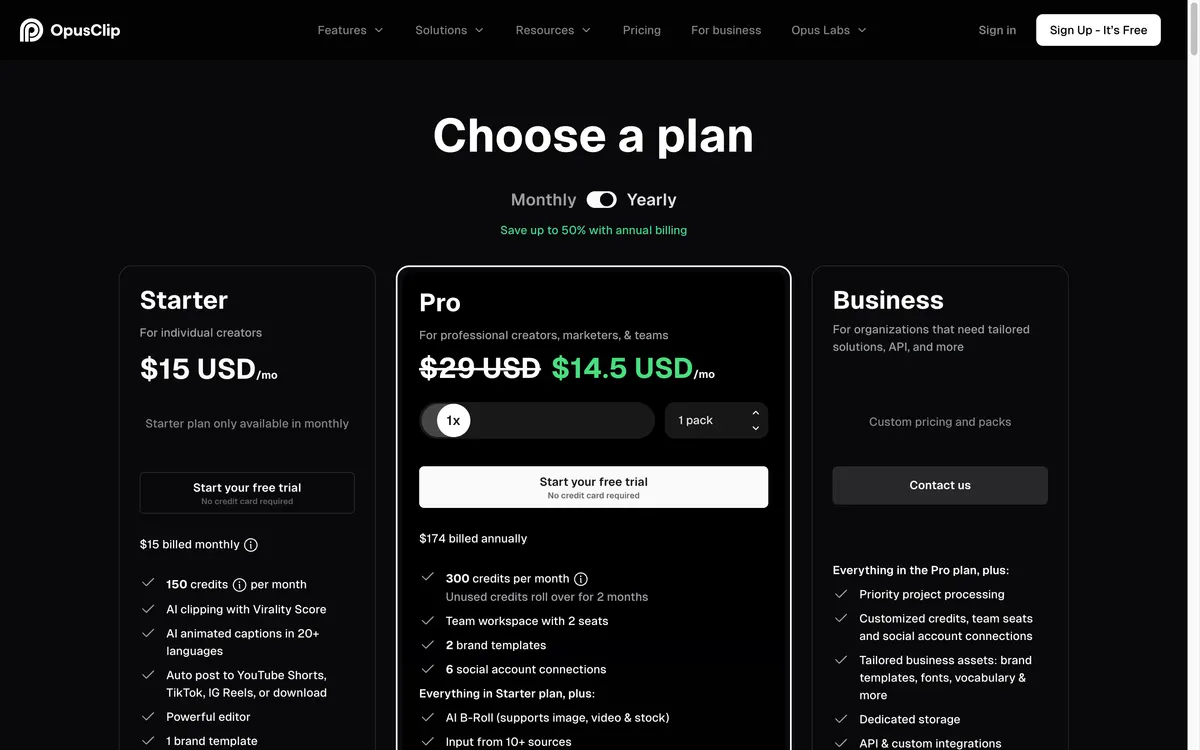
OpusClip · Official website screenshot for editorial identification
Recommended for these needs
Best fit for creators clipping about 5 hours of footage a month
Pro is the plan with the scheduler, 16:9 and 1:1 exports and 300 minutes a month, and its yearly option halves the cost per minute, so it fits regular long-form creators better than Starter.
OpusClip
OpusClip link: start on the free 60-minute planOpus Clip pricing starts at $0 for a free plan and runs $15 a month for Starter and $29 a month for Pro, but the price tag is not the number that matters. OpusClip bills in credits, and one credit equals one minute of the video you upload, not one finished clip. This guide checks OpusClip's official pricing page and help center on October 25, 2026, then does the math on what a clip, an episode and a month actually cost.
Prices below are USD. Plan prices, features and limits come from opus.pro/pricing. Credit rules, expiry, trial and cancellation come from help.opus.pro. Where a number comes from a third party rather than an official page, the text names the source.
Quick answer
- Opus Clip pricing per month: Free $0 (60 minutes), Starter $15 (150 minutes), Pro $29 (300 minutes), Business custom.
- What a credit buys: 1 credit = 1 minute of source video. A 30-minute podcast costs 30 credits whether it produces 3 clips or 20.
- Cost per source minute: about $0.10 on Starter and monthly Pro. Yearly Pro is about $0.05 ($174 for 3,600 minutes, as shown on the official pricing page on October 26, 2026).
- Free plan: 60 minutes a month, watermark, 1080p cap, clips and storage expire after 3 days.
- Best way to start: use the free plan for one or two videos, then pick Starter for up to about 5 half-hour episodes a month or Pro if you need 10 or more, a scheduler or 16:9 and 1:1 exports.
Opus Clip pricing plans at a glance
| Plan | Price | Processing minutes | Watermark | Export and storage | Seats |
|---|---|---|---|---|---|
| Free | $0 | 60 per month | Yes | Up to 1080p, 9:16 only; MP4 and storage expire after 3 days | 1 |
| Starter | $15 per month | 150 per month | No | Highest resolution, 9:16 only; 30-day MP4 limit, storage expires after 29 days | 1 |
| Pro, monthly | $29 per month | 300 per month per pack | No | 9:16, 1:1 and 16:9; no MP4 limit; 100GB storage | 2 per pack, up to 4 |
| Pro, yearly | $174 billed annually (about $14.50 per month, as shown on October 26, 2026) | 3,600 per year | No | Same as Pro monthly | 2 per pack, up to 4 |
| Business | Custom | Custom | No | Unlimited storage, 4K download, SSO | Unlimited |
Free, Starter, Pro and Business details are from opus.pro/pricing and help.opus.pro/docs/article/plans-and-credits. The pricing page's yearly view showed Pro at $14.5 per month, $174 billed annually, with 'Save up to 50% with annual billing' on October 26, 2026; quso.ai and BIGVU reviews report the same $174 and the help center confirms 3,600 yearly minutes. A second capture of the same page the same day showed a lower annual offer (Pro $11.5 per month, $138 billed annually), so the yearly price appears to vary. Confirm the price on the checkout screen before paying.
Starter already removes the watermark and unlocks Google Drive, Zoom and Vimeo imports, full clipping modes, text and timeline editing, a virality score and posting to YouTube Shorts, TikTok and Instagram. Pro adds the scheduler, extra platforms such as LinkedIn and X, 16:9 and 1:1 exports, Premiere Pro and DaVinci Resolve export, team workspace, API and Zapier. If you want to look at the live plan cards, OpusClip link: start on the free 60-minute plan opens the official site.
Opus Clip credits: how processing minutes are counted
OpusClip's help center states the rule directly: "1 credit per minute of the original video imported." Three details decide your real cost.
- Whole minutes only. A video under 1 minute rounds up to 1 credit. Partial minutes round down, so a 4.5-minute video is billed as 4.
- Clips do not change the price. A 45-minute video costs 45 credits whether it yields 3 clips or 20.
- You can process part of a video. The processing timeframe slider lets you clip only the section you want and pay for fewer minutes.
Posting to X is the one extra charge: 3 credits per clip per X account, refunded if the post fails or you delete the scheduled post. The help article does not say whether reprocessing a video charges credits again, so assume it might.
Opus Clip cost per clip and per minute, with the math
OpusClip has no per-clip price, so Fieldnotes worked it out from the plan prices and the credit rule above.
| Plan | Price / credits | Cost per source minute | One 30-minute episode | Half-hour episodes per month |
|---|---|---|---|---|
| Starter | $15 / 150 | $0.100 | $3.00 | 5 |
| Pro, monthly | $29 / 300 | $0.097 | $2.90 | 10 |
| Pro, yearly | $174 / 3,600 | $0.048 | $1.45 | 10 per month on average |
| Free | $0 / 60 | $0 | $0 | 2 |
Now turn minutes into clips. quso.ai, a competing clipping tool, reports from its own data a median of 9 AI clips per long video, with 15.5% of generated clips actually exported. Treat that as a rough benchmark rather than an OpusClip statistic. On those numbers a 30-minute episode on Starter costs $3.00 and yields about 9 clips, or $0.33 per generated clip. Only about 1.4 of the 9 get exported, so the cost per clip you actually publish is about $2.15 on Starter and about $1.04 on yearly Pro. BIGVU, another competitor, says to expect to discard roughly 20 to 40% of clips, so the real discard rate varies by content.
Two practical conclusions follow. First, on monthly billing Pro is not cheaper per minute than Starter ($0.097 against $0.100); you are paying for features, seats and volume. Only the yearly Pro commitment cuts the per-minute rate roughly in half. Second, budget by hours of footage recorded, not clips wanted. A weekly 60-minute podcast needs about 240 to 260 credits a month, which is more than Starter's 150 and fits inside Pro's 300.
Opus Clip free plan: what you get and the catch
The free plan gives 60 processing minutes a month, AI captions with emoji and keyword highlighting, imports from YouTube and local files, one brand template and 9:16 output up to 1080p. The catches are listed on the official pages:
- Exports carry a watermark.
- MP4 downloads and media storage expire after 3 days.
- No virality score, reprompting, editing tools or scheduler.
- You can only switch down to Free if you have less than 30 credits left.
The pricing page also shows a free trial on Starter and Pro. The help center says a trial Pro account converts automatically to the free plan after 7 days and cannot be paused. The pricing page says no credit card is required to start the Starter or Pro trial.
Do Opus Clip credits expire?
Yes. The help center says monthly-plan credits last 60 days, which means unused minutes roll over for one extra month and then vanish. Yearly plans grant all credits at purchase and they are valid for 12 months. Third-party reviewers add that there is no expiry reminder.
Cancellation is where the official pages disagree. One article says leftover credits expire at their original expiration date after you cancel. Another says they expire at the end of the current billing cycle. Plan on the stricter reading and use your minutes before cancelling. Also note that eesel, a third-party review, reports that projects become inaccessible 3 days after cancelling, so export what you need first.
Is Opus Clip worth it? Review notes from the sources
Fieldnotes did not use the product for this guide. The picture below is assembled from official pages and published reviews, most of them written by competing vendors, which is a reason to read them with care.
- In its favor: clear credit rule, many import sources, virality score on paid plans, Premiere Pro and DaVinci export on Pro, and a free plan that lets you judge clip quality first. eesel reports G2 at 4.6 out of 5 from 118 reviews.
- Against it: eesel reports Trustpilot at 4.0 out of 5 from 302 reviews and Capterra at 3.6, with the most common complaints being projects vanishing after cancellation, no renewal reminder and a hard cancellation flow. BIGVU says Starter gives AI output with no editor, although OpusClip's pricing page lists an editor on Starter, and that a share of clips need to be discarded.
- Verdict by use case: worth testing for creators who publish long videos regularly. Poor value if you only need a few clips a year, or if you want to edit heavily on a cheap plan.
Which Opus Clip plan should you pick?
- Testing or 1 to 2 videos a month: Free, accepting the watermark and 3-day expiry.
- Up to about 5 half-hour episodes a month, one seat: Starter at $15.
- 10 or more half-hour episodes, a scheduler, 16:9 or 1:1 exports, or a small team: Pro at $29, or yearly Pro if you will use the minutes steadily for 12 months.
- More than 4 seats, API volume or SSO: Business through the contact form.
For a creator who clips about five hours of footage a month, Pro on yearly billing is the lowest cost per minute that Fieldnotes could find in the published numbers, provided the yearly price you see at checkout matches the $174 shown on OpusClip's pricing page on October 26, 2026. The page also served a lower annual offer the same day, so confirm the price at checkout before committing. You can look at the plans through the OpusClip link: start on the free 60-minute plan.
Opus Clip alternatives that do the same job
Only tools that turn long videos into short clips belong in this comparison. Prices differ in how they are billed, so the table shows each tool's own unit.
| Tool | Billing unit | Published price | Free option |
|---|---|---|---|
| OpusClip | 1 credit = 1 source minute | $15 (150 min), $29 (300 min) | 60 minutes a month, watermark |
| Klap | Clips generated per month | $14 (100 clips), $39 (300), $94 (1,000), shown with yearly billing | Not stated on the pricing page |
| Vizard | 1 credit = 1 source minute | Paid prices did not load when checked; Creator starts at 600 credits a month | 60 credits a month, watermark, 720p export |
Klap charges per clip while OpusClip charges per source minute, so the cheaper tool depends on how many clips you keep from each video. Vizard uses the same one-credit-per-minute rule as OpusClip; check its live page for current prices. For the wider workflow around short video, see our Blotato pricing guide for scheduling and posting, Subscribr pricing for planning YouTube scripts, and the AI video generator cost per clip workflow for generated footage.
Frequently asked questions
How much does Opus Clip cost per month?
The official pricing page lists Free at $0, Starter at $15 and Pro at $29 per month, with Business on custom pricing. The pricing page's yearly view showed Pro at $174 billed annually ($14.5 per month) on October 26, 2026, and the page also served a lower annual offer the same day, so confirm the price at checkout.
Is Opus Clip free or paid?
Both. A free plan gives 60 processing minutes a month with a watermark and 3-day clip expiry. Removing the watermark requires Starter or Pro.
How many clips do I get per credit?
Clips are not counted. One credit is one minute of uploaded video, so a 30-minute video uses 30 credits regardless of how many clips come out.
Do Opus Clip credits roll over?
Monthly credits last 60 days, so they roll over for one extra month. Yearly credits last 12 months. After cancelling, leftover credits expire, and the help center gives two different dates for when.
Can I add more minutes without changing plan?
Yes, on Pro. You can buy top-up credits from the subscription page (Add more credits), or add packs that each give 300 more minutes a month and 2 more seats, up to 4 seats. Seats cannot be bought on their own, and the help center does not publish the top-up or pack price.
Is there a better alternative to Opus Clip?
It depends on how you count cost. Klap bills per clip and Vizard bills per source minute like OpusClip. Test each free option on the same video before paying.
In short, Opus Clip pricing is $15 for 150 minutes or $29 for 300, about $0.10 per source minute, with yearly Pro roughly half that. Count minutes of footage, not clips, start on the free plan, and use credits before they expire.
Prices, credits and policies checked October 25, 2026 and can change. Plan prices and features are from opus.pro/pricing; credit, expiry and trial rules are from help.opus.pro.
Explore the available options
Confirm the final price, eligibility, and refund terms on the seller page before purchasing.
Sources & verification dates
- OpusClip pricing page (plans, features, limits) ↗2026-10-25
- OpusClip help: Plans (processing minutes, packs, free plan switch) ↗2026-10-25
- OpusClip help: How Do Credits Work? (1 credit per minute, rounding, X posting, expiry) ↗2026-10-25
- OpusClip help: Upgrade & Downgrade (60-day and 12-month expiry, packs) ↗2026-10-25
- OpusClip help: Where did my minutes go? ↗2026-10-25
- OpusClip help: Pause or Cancel a Free Trial (7-day trial) ↗2026-10-25
- Opus Clip Pricing 2026 (quso.ai, updated October 21, 2026) ↗2026-10-25
- OpusClip pricing in 2026 (eesel AI, edited June 9, 2026) ↗2026-10-25
- Is Opus Clips Worth It? (BIGVU, April 12, 2026) ↗2026-10-25
- Klap pricing ↗2026-10-25
- Vizard pricing ↗2026-10-25
1 option checked in this guide
See the options