Higgsfield Cancel Subscription: Steps, Credits, Refunds
Higgsfield cancel subscription steps from Manage Account, what happens to your credits, and the 7-day refund rules for monthly and annual plans.

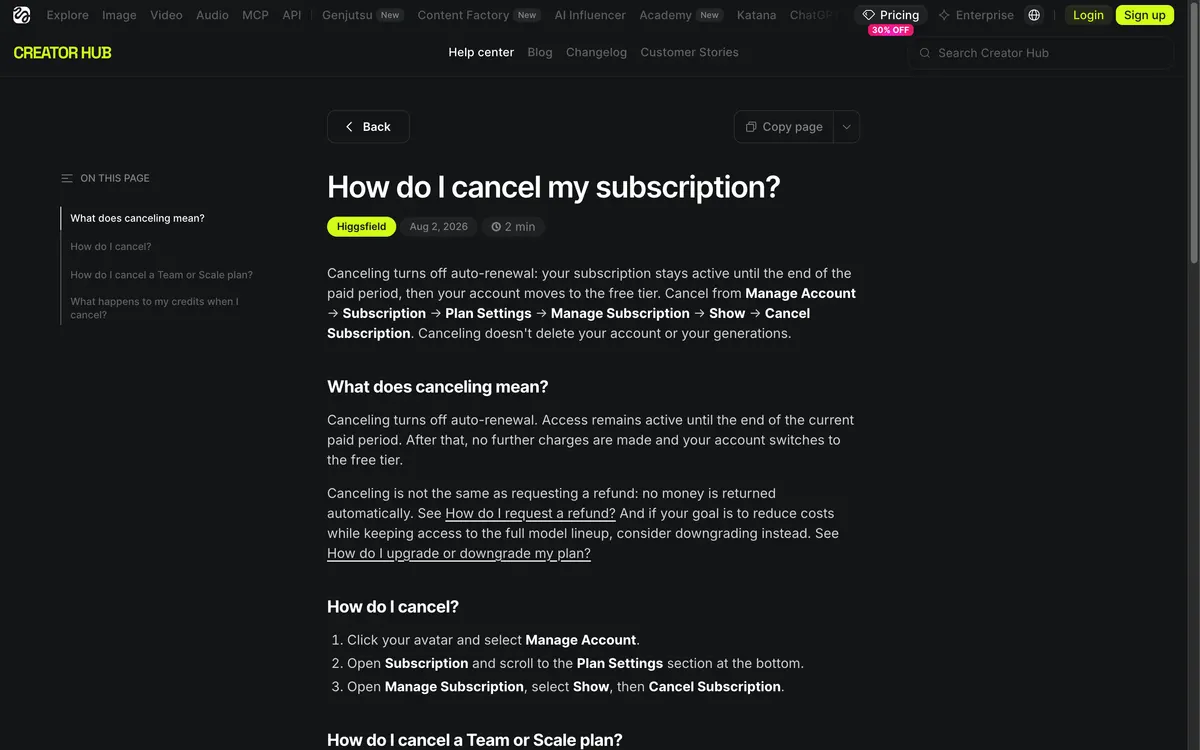
Higgsfield · Official website screenshot for editorial identification
To cancel a Higgsfield subscription, open Manage Account, go to Subscription, scroll to Plan Settings, open Manage Subscription and click Cancel Subscription. That stops auto-renewal and keeps your access until the paid period ends. It does not refund anything, which is the part that trips people up, so this guide covers the steps, what happens to your credits, and the Higgsfield refund rules as the help center and Terms of Use state them on October 25, 2026.
The advice here comes from Higgsfield's help center and Terms of Use, plus clearly labeled user reports. We did not test the cancellation flow ourselves.
Quick answer: cancel under Manage Account, then Subscription, then Plan Settings. Cancelling stops future charges only, you keep the plan until the period ends, and subscription credits then expire permanently. A refund is a separate request to support@higgsfield.ai: it covers an initial purchase only, within 7 days, with no credits used, minus a service fee of up to 6%. Renewals are not refundable, and annual plans get no prorated refund outside that window.
How to cancel your Higgsfield subscription
- Click your avatar and open Manage Account.
- Go to Subscription and scroll down to Plan Settings.
- Open Manage Subscription, choose Show, then click Cancel Subscription.
- Re-open the Subscription page to confirm the plan now shows as ending rather than renewing. The help center does not say whether Higgsfield sends a confirmation email.
Your renewal date is also on the Subscription page, so look there first. Cancelling does not delete your account or your generations, and you can resubscribe at any time from the Pricing page. The Terms of Use (section 10.3) name the 'Payment Setting' page of your account as the cancellation route, which is the same area under a different label.
Cancel a Higgsfield annual subscription
The steps are the same. The difference is the timing: the plan 'stays active until the end of the paid year.' Disabling auto-renewal means 'you keep access until the year ends, no further charges follow.' Cancel before the renewal date, because a renewal is not an initial purchase and cannot be refunded.
Team, Scale and Enterprise plans
Workspace plans are different: the workspace Owner cancels them through the Organization settings, not an individual account's Plan Settings.
Cancel by email
If the in-app option does not work, the Terms of Use allow cancellation 'by contacting support@higgsfield.ai.' The email must come from the subscriber's email address on the account. Include your account email, the plan and, if you want a refund, the purchase date and amount.
Subscribed through the App Store or Google Play?
Higgsfield's help pages and Terms do not describe in-app purchases. The Terms cover cancellation 'if you purchased your Subscription directly from Company' and say payments run through Stripe. If your charge appears on an Apple or Google statement instead, cancel through the store that bills you:
- iPhone: Settings, tap your name, Subscriptions, tap the subscription, Cancel Subscription. Apple also offers this at account.apple.com.
- Android: open your Google Play subscriptions page, pick the subscription and tap Cancel subscription. Uninstalling the app does not cancel it.
What happens to your credits after you cancel
| Item | After cancelling |
|---|---|
| Plan access | Continues until the current billing period ends, then the account moves to the free tier |
| Subscription credits | Usable until the paid period ends, then they 'expire permanently' |
| Credit Packs, Auto-Refill and Boost Credits | Stay on the free plan and work on free-tier models until their 90-day validity ends |
| Promo credits | Stay usable on free-plan models until their own expiry date |
| Auto-Refill charges | Stop once you cancel |
| Existing generations | Kept. After long inactivity, older content may move to cold storage but is not deleted |
| Watermark on new outputs | New generations follow free-tier rules. Files you already made are unchanged |
Because subscription credits do not roll over, spend them before the period ends if you plan to leave.
Higgsfield refund policy: who can get one
The help center article 'How do I request a refund?' sets five conditions, and all must hold.
- You ask within 7 days of the first purchase, 'or as permitted by the law in your jurisdiction.'
- No credits have been spent. Free generations and Unlimited model generations do not count.
- It is the first purchase, not a renewal. Renewals are never refunded.
- Credit Packs, Auto-Refill charges and credit-adding Exclusive Offers follow the same 7-day, no-usage rule.
- Offers that grant access or features 'are non-refundable once the access is granted.'
'Never used' is measured by credits, not by logins. Browsing the interface does not disqualify you, but 'if any credits have been used, a refund can't be issued.' The rule is all or nothing, with no partial refund for small usage.
Refund amount and timing
'A service fee of up to 6% is deducted from the refund.' Money returns to the original payment method in roughly 5 to 10 business days depending on your bank. The subscription ends the moment the refund is processed and the account drops to the free tier.
How to request a Higgsfield refund
Use the contact page, which lists support@higgsfield.ai for 'Billing, refunds, and anything that needs a look at your account.' Include your account email, the purchase date, the amount charged and a short reason. The 'Higgsfield refund phone number' searches return no official number: the contact page we read lists email only.
Cancelling is not a refund
The help center says 'Canceling and refunding are two separate actions.' Cancelling stops future billing and no money is returned automatically. If your 7-day window has passed, 'a refund isn't available under the standard policy' and access simply continues through the paid period. Eligibility depends on when you first bought and whether credits were used, not on whether you have cancelled.
Annual plan refunds
Within 7 days and with no credits used, you get the purchase amount minus a fee of up to 6%, or you can switch to monthly: the 11 unused months are refunded, minus the same fee, and you keep access and credits. Outside that window, 'Higgsfield does not provide prorated refunds for the unused part of an annual term.' You can still disable auto-renewal and use the plan until the year ends. Where local law requires it, a partial refund may apply.
Accidental charges and unrecognized renewals
Accidental upgrades, picking annual instead of monthly and buying a Credit Pack by mistake go through the same process. Check billing history under Manage Account, Subscription, Upcoming Invoice, All invoices. Some banks show a temporary authorization hold that drops off by itself. Unfamiliar charges are often an automatic renewal, a prorated upgrade, an Auto-Refill top-up or tax. A missed renewal is not refundable.
Refund exceptions and EEA and UK consumers
- If a paid plan is significantly degraded or a paid feature is shut down, you can cancel and recover the unused portion (Terms of Use section 1.7).
- If Higgsfield terminates your account without fault on your part, unused fees and purchased credits are refunded, but promo credits are not.
- Consumers in the EEA and UK have a 14-day right of withdrawal, which ends once you start using the content, for example by spending credits. Email support@higgsfield.ai to use it.
- Upgrade refunds: if you have not touched credits from the new tier, you can ask for the extra upgrade cost back within 7 days of upgrading.
Downgrade instead of cancelling
If the goal is a lower bill rather than leaving, downgrading keeps you on the platform. The help center says downgrades 'take effect at the start of your next billing cycle,' your billing date does not change, and you keep full access to your current plan and its credits until then. After that, credits reset to the new plan's allowance. The option sits 'in the detailed comparison section, not on the main plan cards' on the Pricing page.
- On any billing period, a downgrade takes effect at the start of your next billing cycle.
- Credit Packs keep their 90-day validity, and Auto-Refill settings stay in place.
For current plan prices and what each plan includes, see our Higgsfield AI pricing guide. If you want to stay free instead, is Higgsfield free explains what the Free plan keeps.
Higgsfield cancellation complaints: what users report
A MindStudio article dated July 28, 2026, which sells competing AI media products, summarizes user reports from Higgsfield's Discord: cancellation requests that 'couldn't be verified,' support paths that dead-end, and one case of credits removed mid-cycle after cancelling and returned after a public complaint. The article labels these as reported allegations, and none are dated. They are not Higgsfield policy.
The practical lesson is documentation. Screenshot the cancellation confirmation, keep any confirmation email you receive (the help center does not say one is sent), and cancel a few days before the renewal date, not on it. If you email support, write from the account's registered address. A third-party guide also notes that closing the whole account, which is different from cancelling, makes content inaccessible and deletes it within 90 days, so do not close the account just to stop billing.
Resubscribing or picking a cheaper plan
You can resubscribe from the Pricing page at any time, with one active subscription per account. Promo prices usually cover only the first payment, after which billing returns to the normal rate, and offer perks such as unlimited windows 'expire and are not renewed.' If you leave and later come back, Higgsfield says a partner-link visitor who logs in through the link gets a personal discount of up to 50% for three hours from login, and the percentage is shown after login.
Log in through this link: up to 50% off for 3 hours (Fieldnotes may earn a commission and is an independent affiliate, not an official partner).
Frequently asked questions
How do I cancel my Higgsfield subscription?
Open Manage Account, Subscription, then Plan Settings, choose Manage Subscription and click Cancel Subscription. Your plan stays active until the billing period ends.
How do I get a refund from Higgsfield AI?
Email support@higgsfield.ai with your account email, purchase date and amount. A refund requires an initial purchase within 7 days with no credits used, minus a fee of up to 6%.
Can I get a refund after cancelling my subscription?
Only if you still meet the standard conditions. Cancelling does not trigger a refund, and the 7-day window counts from your first purchase, not from the cancellation.
Can I get a refund for a subscription I never used?
Yes, within 7 days if no credits were spent. Logging in does not count as use, and free or Unlimited generations do not either.
What happens to my credits if I cancel?
Subscription credits work until the paid period ends, then expire permanently. Credit Packs and promo credits stay on the free plan until their own expiry.
Can I cancel Higgsfield during a free trial?
Yes. The July 2026 trial posts say cancelling is one click under Manage Account, Subscription, and that you keep access until the 24 hours end. Cancel before the trial converts to Plus.
Bottom line: cancelling and refunding Higgsfield
Cancel before the renewal date, spend your subscription credits first, and file any refund request within 7 days of the first purchase with no credits used. If cost is the issue, a downgrade at the next cycle may be better than leaving.
Policies checked on October 25, 2026 and may change. Fieldnotes is not affiliated with Higgsfield beyond its public affiliate program.
Sources & verification dates
- Higgsfield Help Center: How do I cancel my subscription ↗2026-10-25
- Higgsfield Help Center: How do I request a refund ↗2026-10-25
- Higgsfield Help Center: Refunds section ↗2026-10-25
- Higgsfield Help Center: Partial refund for unused annual time ↗2026-10-25
- Higgsfield Help Center: Why didn't I receive a refund after canceling ↗2026-10-25
- Higgsfield Help Center: Refund for a subscription I never used ↗2026-10-25
- Higgsfield Help Center: Refund for an accidental charge ↗2026-10-25
- Higgsfield Help Center: How do I upgrade or downgrade my plan ↗2026-10-25
- Higgsfield Help Center: How do promo prices work ↗2026-10-25
- Apple Support: Cancel a subscription ↗2026-10-25
- Google Play Help: Cancel a subscription ↗2026-10-25
- MindStudio: Higgsfield cancellation complaints (Jul 28, 2026, third party) ↗2026-10-25
- AI Tool Curator: How to cancel Higgsfield (third party) ↗2026-10-25
- Higgsfield Terms of Use Agreement ↗2026-10-25
- Higgsfield affiliate program page (referred-user discount) ↗2026-10-25
- Higgsfield contact page (billing and refunds) ↗2026-10-25