Reader offer
Magnific
Magnific link: up to 40% off (25% annual + extra 20% on your first annual payment)Affiliate link: Fieldnotes earns a commission if you purchase through this link.Magnific vs Higgsfield compared on October 1, 2026 official pricing: features, pros and cons, team and enterprise plans, refunds, and both referral discounts.
Magnific
Magnific link: up to 40% off (25% annual + extra 20% on your first annual payment)Affiliate link: Fieldnotes earns a commission if you purchase through this link.Higgsfield
Higgsfield log-in link with up to 50% off for 3 hoursAffiliate link: Fieldnotes earns a commission if you purchase through this link.
If you are comparing Magnific vs Higgsfield, you have probably noticed how similar they look from the outside. Both generate images and video, both put outside models such as Kling, Seedance and Nano Banana in one workspace, and both pricing pages carry discount badges. That makes it hard to tell which subscription is worth paying for.
This guide compares features, pros and cons, individual, team and enterprise pricing, refund terms and a quick how-to, using what the two official pricing pages, help centers and enterprise pages showed on October 1, 2026. We did not run our own quality tests, so there is no "which one looks better" ranking here. Instead, you get the criteria for picking the one that fits your work. Both services also have a discount through their referral links, and the conditions are different, so they get their own section.
Quick answer
The two offers apply to different plans at different moments. Decide how you will pay before you click.
Magnific link: up to 40% off (25% annual + extra 20% on your first annual payment)Affiliate link: Fieldnotes earns a commission if you purchase through this link.
Higgsfield log-in link with up to 50% off for 3 hoursAffiliate link: Fieldnotes earns a commission if you purchase through this link.
Both links are affiliate links. If you buy through them, Fieldnotes may earn a commission at no extra cost to you.
| Item | Magnific | Higgsfield |
|---|---|---|
| Origin | AI upscaler. Freepik renamed itself Magnific; same company | AI video and image generation studio |
| Upscaling | Own Creative and Classic models, up to 16x. The Magnific Upscaler (up to 10K) is Premium+ and above. Topaz upscalers included from Premium+ | Upscale tool |
| Signature tools | Spaces (node-based shared canvas), image and video editing, background remover, voice and sound effects | Soul 2.0 image model, Soul ID characters, Cinema Studio, Supercomputer agent, Marketing Studio, Canvas |
| Outside models (examples) | Seedance 2.5, Kling 3.0, Veo 3.1, Sora 2, Nano Banana Pro, GPT Image 2 | Seedance 2.5, Kling 3.0, Veo 3.1, Sora 2, Nano Banana Pro (50+ models per the enterprise page) |
| Stock assets | 250M+ photos, videos, vectors and PSDs | None |
| Unlimited generations | Selected models per plan (for example, Nano Banana 2 1K on Premium+) | Selected models per plan. Web only; not on MCP, Canvas or Supercomputer |
| Integrations | MCP for Claude and ChatGPT, plugins, ComfyUI, credit-based API | MCP for Claude and ChatGPT, CLI, API |
| No training on your data | Stated on every plan card, including individual plans | Stated for Enterprise agreements only, per the help center |
| Refunds | Within 30 days of payment, only with zero downloads and zero credits used | Within 7 days of the first purchase, zero credits used, no renewal refunds, fee of up to 6% |
Both platforms host several outside video models, so the split is not simply "Magnific for images, Higgsfield for video". The difference is in their own tools. Magnific works like a design bench that bundles upscaling, stock and editing. Higgsfield centers on video production tools such as character consistency and camera direction.
| Plan | Monthly billing | Annual billing (per month) | Annual with link discount (first annual payment only) | Credits |
|---|---|---|---|---|
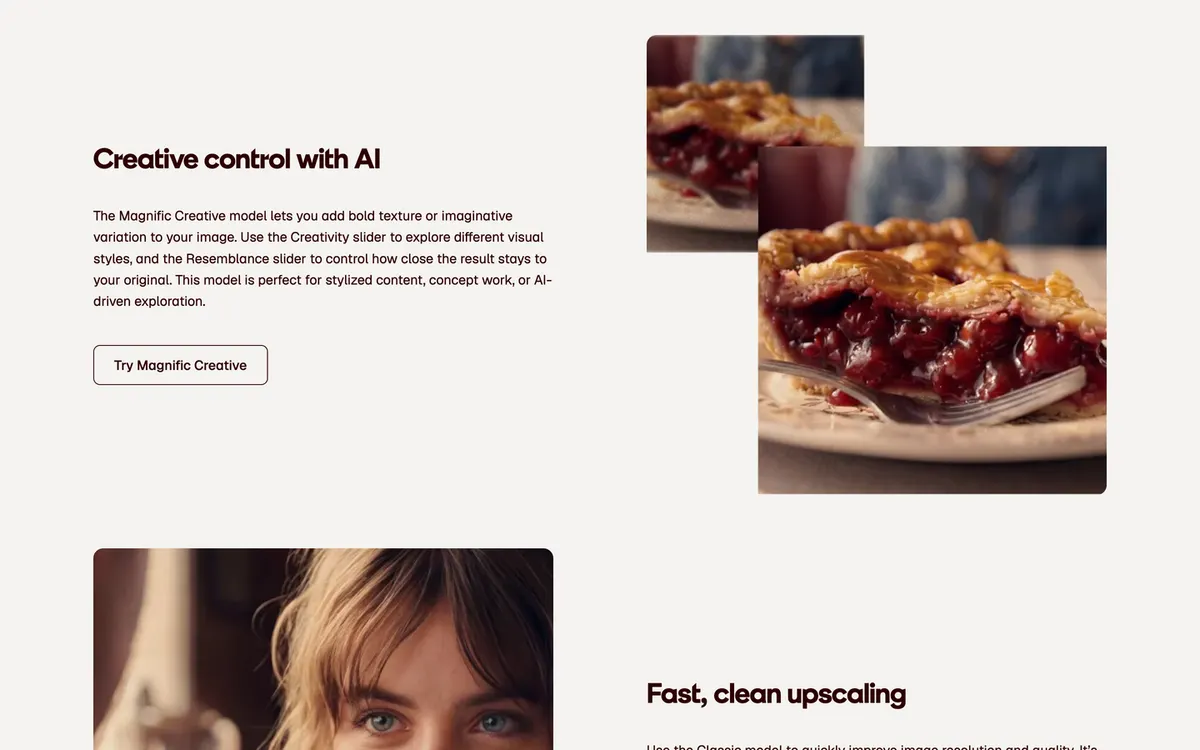
| Premium | $20 | $14.50 | $11.60 | 20K per month (monthly) / 240K per year (annual) |
| Premium+ | $45 | $33.75 | $27 | 45K per month (monthly) / 600K per year (annual) |
| Pro Starter | $90 | $66.92 | No extra discount | 1.5M or 4M per year |
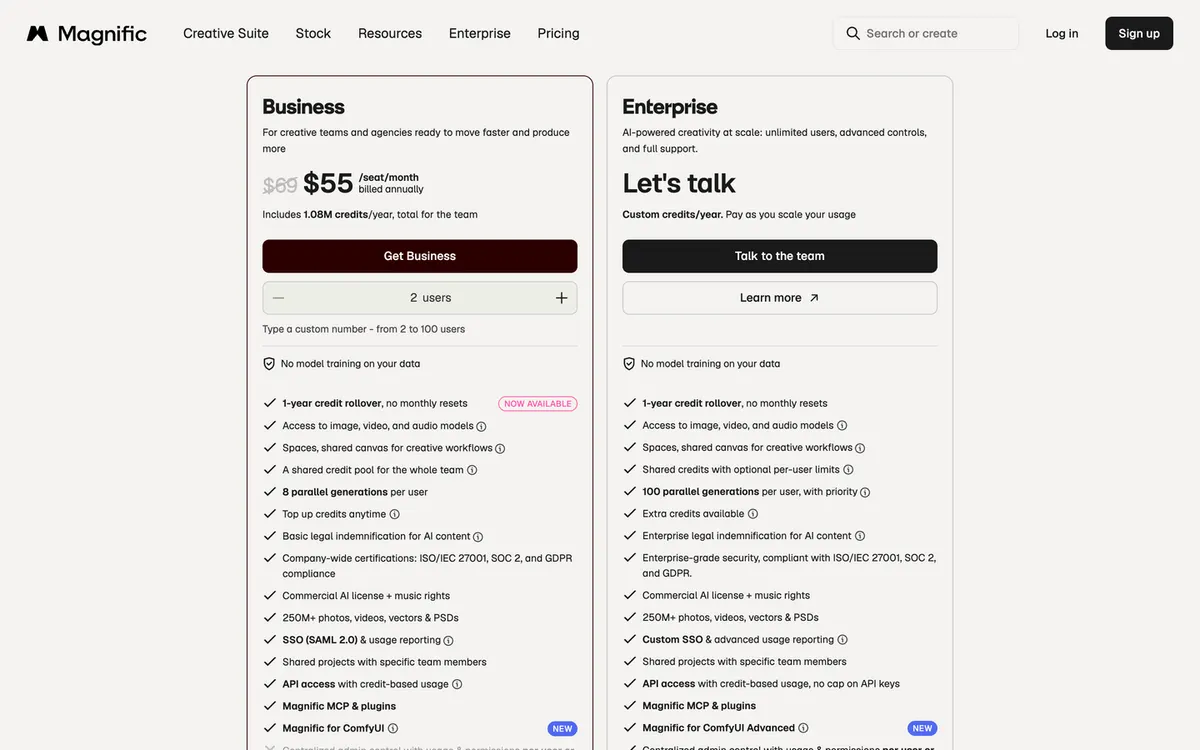
| Business (teams) | $69 per seat | $55 per seat | Not applicable | 1.08M per year for the whole team, 2 to 100 users |
| Enterprise | Contact sales; custom credits based on usage | Custom |
The link prices apply to the first annual payment only. Renewals are charged at the standard annual price ($14.50 or $33.75 per month).
Annual credits do not reset each month and stay valid for a year, which helps if your workload swings from month to month. Prices exclude VAT and local taxes.
| Plan | Monthly billing | Annual billing (per month) | What you get |
|---|---|---|---|
| One-time pass | $3 (one time) | 40 credits, 2 days of unlimited Soul 2.0 | |
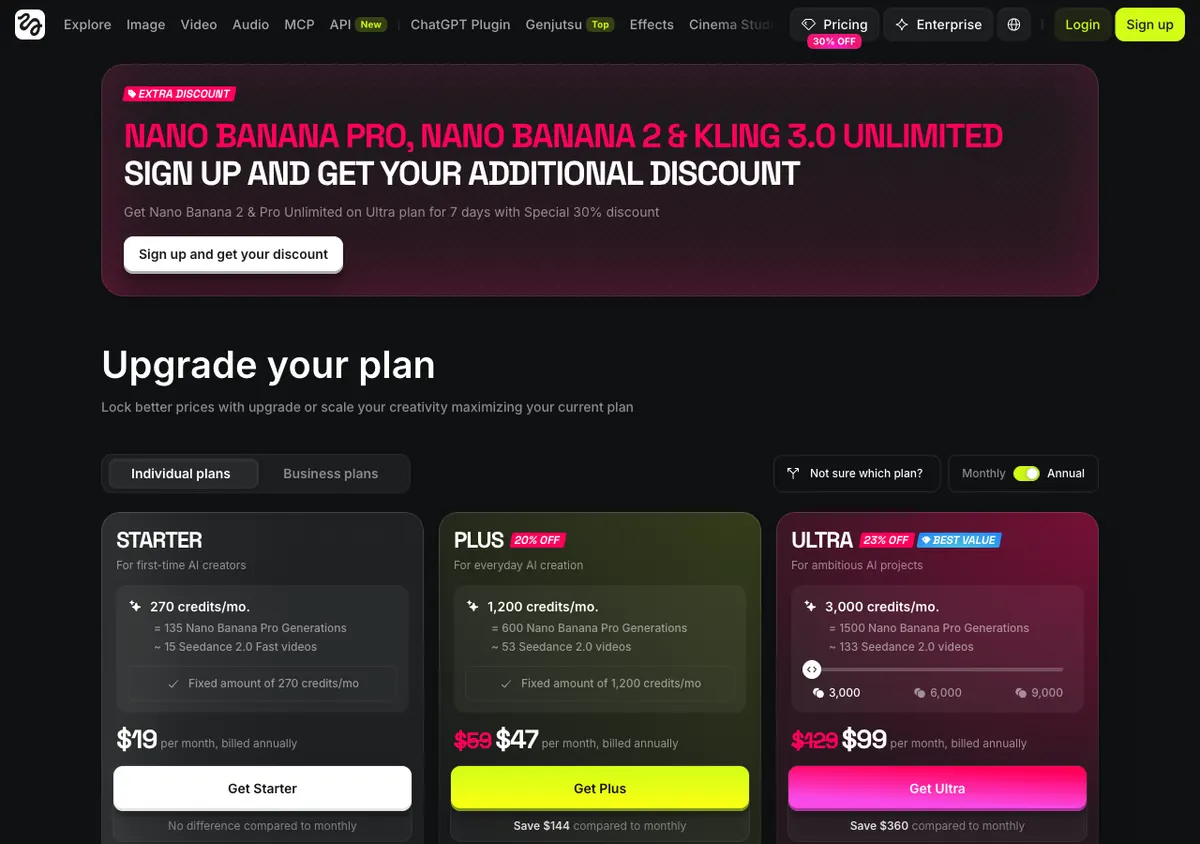
| Starter | $19 | $19 (no annual discount) | 270 credits per month, up to 2 video and 4 image parallel generations |
| Plus | $59 | $47 | 1,200 credits per month, 7 unlimited and free generation models |
| Ultra | $129 | $99 | From 3,000 credits per month (6,000 or 9,000 options), 7-day unlimited Nano Banana Pro 2K |
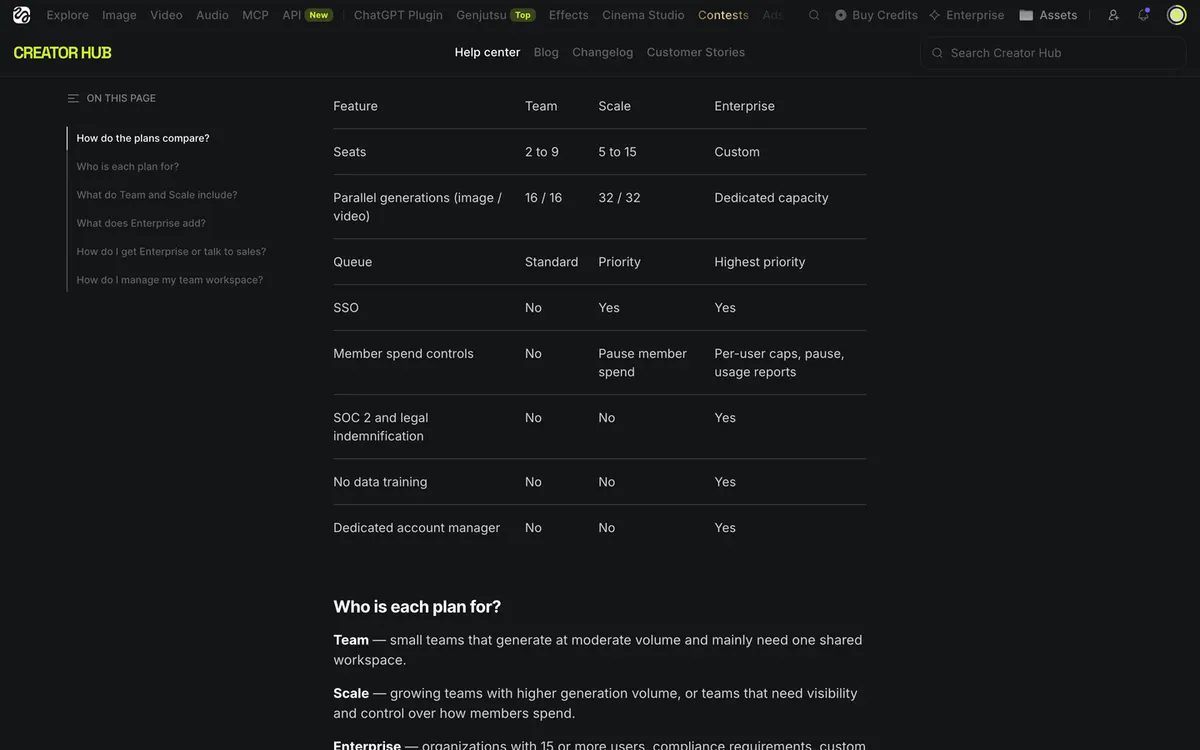
| Team | $79 per seat | $65 per seat | 2 to 9 seats, 1,000 credits per seat per month pooled, 16 parallel generations |
| Scale | $215 per seat | $150 per seat | 5 to 15 seats, 2,500 credits per seat per month, priority queue, SSO, 32 parallel generations |
| Enterprise | Contact sales | Unlimited seats, custom credits |
Starter costs the same on annual billing. The page's promo banners and discount badges can change between visits, so confirm the final amount at checkout. Ultra's credit options (3,000, 6,000 or 9,000) change the price, so check the option you pick.
For a team or company rollout, check security, permissions and legal protection before price.
| Item | Magnific Enterprise | Higgsfield Enterprise |
|---|---|---|
| Users | Unlimited users | Unlimited seats, sub-workspaces |
| Credits | Custom credits, optional per-user limits | Custom credits, allocation across teams |
| Parallel generations | 100 per user, with priority | Dedicated capacity, highest-priority queue |
| Certifications | ISO/IEC 27001, SOC 2, GDPR (listed from the Business team plan) | Help center lists SOC 2 for Enterprise; the enterprise page says "SOC 2-aligned" controls and GDPR compliance |
| Login and access | Custom SSO, advanced usage reporting | SSO/SAML, role-based access control |
| Legal protection | Enterprise legal indemnification for AI content; Business includes basic indemnification | Legal indemnification is Enterprise only, per the help center |
| No training on your data | All plans | Enterprise inputs and outputs excluded from training and treated as confidential (help center: written into Terms of Use Section 4.4 since July 2026) |
| Billing | Arranged with sales | Centralized billing via invoice or PO |
| Training and support | Magnific Studios in-house team, onboarding and dedicated support | Higgsfield Academy, 180 hours of education |
For small teams the gap is clearer. Magnific's Business plan already includes SSO, basic legal indemnification, security certifications and no training on your data. On Higgsfield, per the help center comparison, SSO starts at Scale while indemnification and training exclusion come only with Enterprise. If you need a security review but cannot sign an enterprise contract, Magnific is easier to clear.
Higgsfield's security wording differs between pages: the help center says Enterprise includes SOC 2 and legal indemnification, while the enterprise page uses the phrase "SOC 2-aligned controls". Ask sales for the current audit report before you sign. If you produce video at volume, also get the dedicated capacity terms in concrete numbers.
Yes. For example, you can generate a scene in Higgsfield and enlarge it with the Magnific upscaler. Paying for both adds up, so keeping one on monthly billing and using it only when needed keeps costs down.
Only within 30 days of payment and only if you have not downloaded anything or used any AI credits. Use the support contact form, choose Subscriptions and Payments, then Request a refund and Current invoice, and send it from your account email. Annual plans follow the same 30-day rule, with no partial refunds for unused months.
Within 7 days of the first purchase (or longer if your local law requires it) and with zero credits used. Free generations and Unlimited model generations do not count as credit usage. If approved, a fee of up to 6% is deducted and the subscription is canceled immediately.
Magnific's help center states that discounts apply to the first payment only and renewals are at the standard price. For Higgsfield, check the renewal price shown at checkout. In both cases, budget the first year and the second year separately.
Yes. Magnific's FAQ says Freepik is now Magnific and it is the same company. If you had a Freepik account, check your current plan in your account's billing page before buying.
If your main job is making photos sharper and more polished, Magnific fits. If you regularly make video with people and camera direction, Higgsfield fits. The discounts work differently, up to 40% off on Magnific (25% annual plus an extra 20% on the first annual payment) versus up to 50% for 3 hours after logging in through the Higgsfield link, so settle on billing and plan first, then use the matching link.
Magnific link: up to 40% off (25% annual + extra 20% on your first annual payment)Affiliate link: Fieldnotes earns a commission if you purchase through this link.
Higgsfield log-in link with up to 50% off for 3 hoursAffiliate link: Fieldnotes earns a commission if you purchase through this link.
Prices, discounts and plan details were checked on the official pages on October 1, 2026 and exclude VAT. Promotions and prices can change without notice, so confirm the final amount at checkout.
Confirm the final price, eligibility, and refund terms on the seller page before purchasing.
Affiliate link: Fieldnotes earns a commission if you purchase through this link.
Affiliate link: Fieldnotes earns a commission if you purchase through this link.
2 options checked in this guide
See the options