Hedra AI Video with Character 3: Step-by-Step Lip Sync Guide
Make a Hedra AI video with Character 3: current Studio steps from one photo and a voice track, lip sync tips, length limits, credits, plans and API rates.
Hedra Character 3 is Hedra's own lip sync model for AI video: you give it one photo and an audio track, and it returns a talking video where the mouth, face and head follow the voice. This guide walks through the current Hedra Studio screens step by step, as captured on October 22, 2026, and explains what changed since the 2025 tutorials, what the model can do, and what it costs.
The Studio interface has moved on since Character-3 launched in March 2025. The talking video workflow now sits in the Video tool's Avatar tab, and the default model there is called Hedra Avatar. The steps below use those current labels, with account details hidden in every screenshot.
Quick answer
Where: Hedra Studio, Video, Avatar tab.
What you need: a clear front-facing portrait (Start frame) and a voice track (Add voice).
Length: the clip follows your audio, up to 10 minutes on Hedra's avatar models.
Cost: Studio plans from $20/month for 2,000 credits; API from 2.5¢ per second at 540p.
Hedra Character 3 and Hedra Avatar: what the names mean
Hedra's talking avatar page says 'Hedra Avatar and Hedra Character 3 are ours', meaning both are Hedra's own audio-driven avatar models. Character 3 was released in March 2025 as the successor to Character 2. In the current Studio, the Avatar tab defaults to a model labeled Hedra Avatar, while an earlier clip in the same account is labeled Hedra Character 3. Hedra's official pages do not publish a side-by-side quality comparison of the two, so the table only lists what each model page states.
Item
Hedra Character 3
Hedra Avatar
Made by
Hedra
Hedra
Released
March 2025
Not stated
Required inputs
Start frame + audio
Start frame + audio
Resolutions
540p, 720p, 1080p
540p, 720p, 1080p
Aspect ratios
1:1, 4:3, 3:4, 16:9, 9:16, 9:21, 21:9
1:1, 4:3, 3:4, 16:9, 9:16, 9:21, 21:9
Max length
Up to 10 minutes
Up to 10 minutes
API rate (540p / 720p / 1080p)
2.5¢ / 5¢ / 6.25¢ per second
2.5¢ / 5¢ / 6.25¢ per second
Studio default in Avatar tab
No (Oct 22, 2026)
Yes (Oct 22, 2026)
If your model menu shows both, run the same photo and audio through each and keep the take you prefer. The workflow below is identical for either model.
How to make a Hedra AI video with lip sync, step by step
Step 1. Open Hedra Studio and choose Video
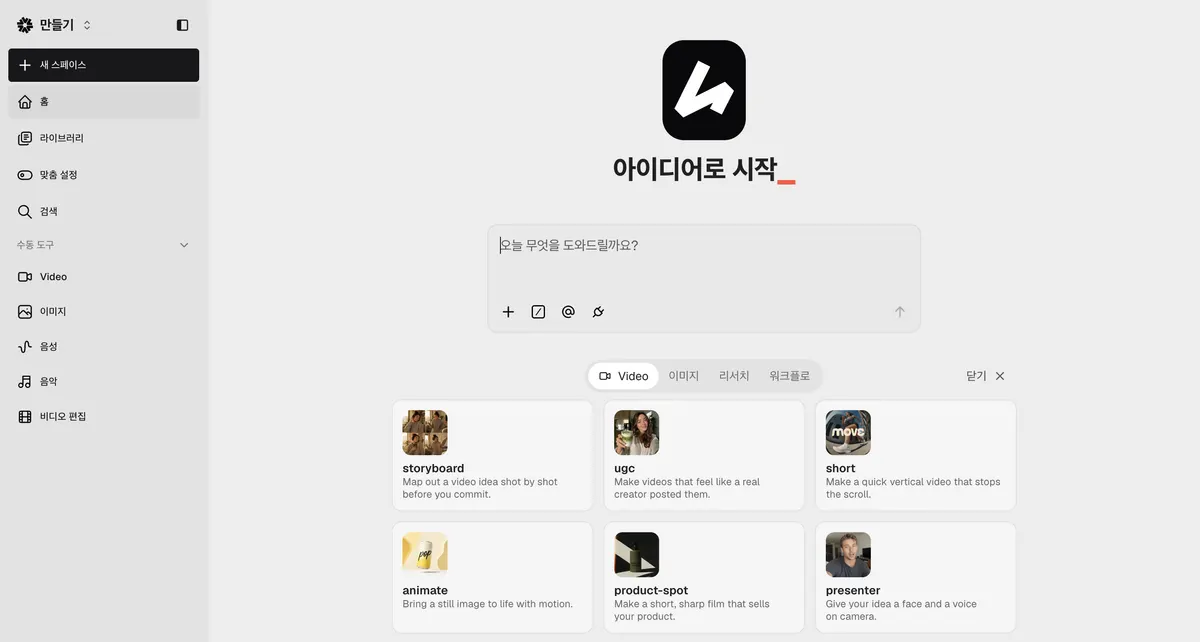
Sign in to Hedra Studio. The home screen shows a prompt box for Hedra Agent and template cards such as presenter ('Give your idea a face and a voice on camera'). You can start from the presenter template, but for full control of the inputs use the manual tools in the left menu and click Video.
Hedra Studio home screen, captured October 22, 2026 (account details hidden)
Step 2. Switch to the Avatar tab
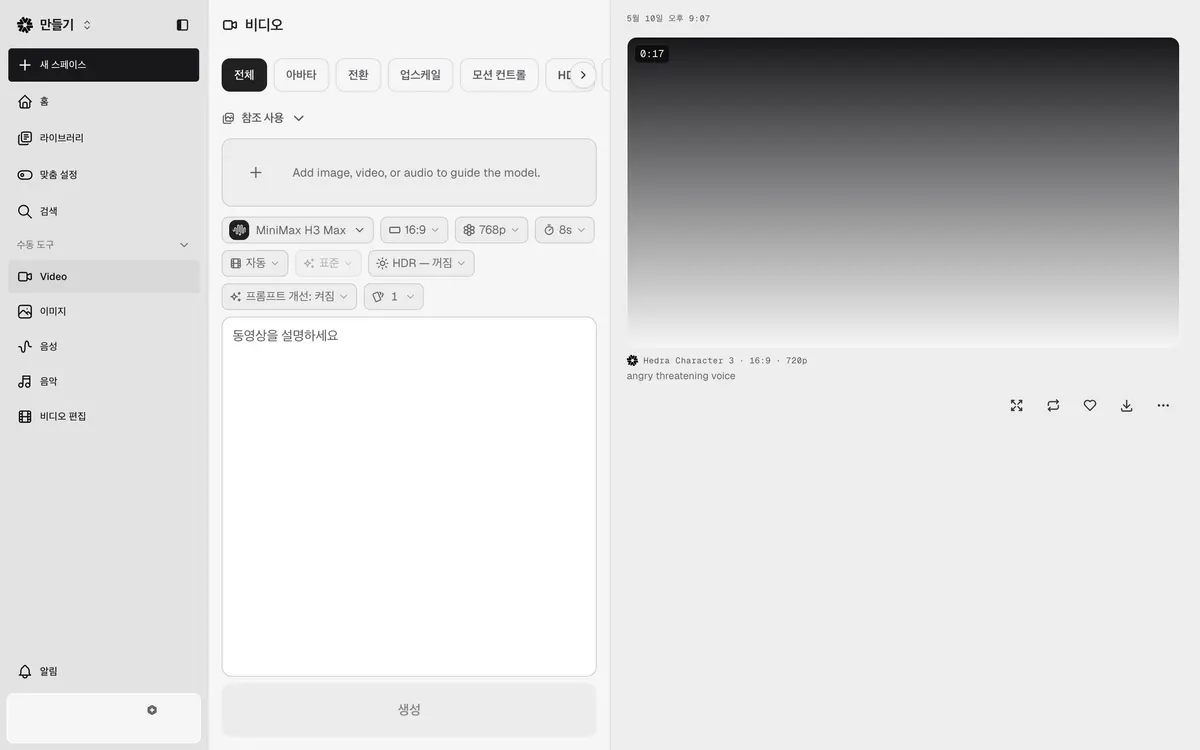
The Video tool opens on the All tab, which runs general video models from a prompt and optional references. In the capture below, the default there is MiniMax H3 Max at 16:9, 768p and 8 seconds. Click Avatar in the tab row (All, Avatar, Transition, Upscale, Motion control, HDR, Background removal) to switch to the photo and voice workflow.
Hedra Studio Video tool, All tab, captured October 22, 2026 (account details hidden)
Step 3. Upload a start frame
Click Start frame and upload the portrait that will speak. Hedra's model pages give clear guidance for this image:
Use 'a well-lit, front-facing headshot' (Hedra Avatar page).
Use 'a clear, close-up portrait with good lighting and a neutral or slightly expressive face' (Character 3 page).
Generate or edit the image first, then animate it. Hedra recommends separating image generation from the animation step for consistent characters.
Keep a set of approved angles of the same character if you make a series.
The image does not need to be a photo of a real person. Hedra's own Character 3 examples include an illustrated podcast host and a talking fox. If you do use a real person's face, Hedra's lip sync page asks you to send only faces and voices you have the rights to use. The API page lists a 10.4 MB limit per start frame image.
Step 4. Add a voice
Click Add voice. Hedra's talking avatar page lists four ways to supply the voice: type a script and pick a voice, clone a voice from a sample you own, record straight in, or upload audio you already have. The language comes from the recording itself, so the same face can speak English, Japanese or German depending on the audio.
Audio quality matters more than any other setting. Hedra's model pages ask for clean, clearly pronounced speech without heavy background noise or reverb. On the API, each audio file can run from 0.5 to 600 seconds, which matches the 10-minute maximum.
Step 5. Check the model, ratio, resolution and duration
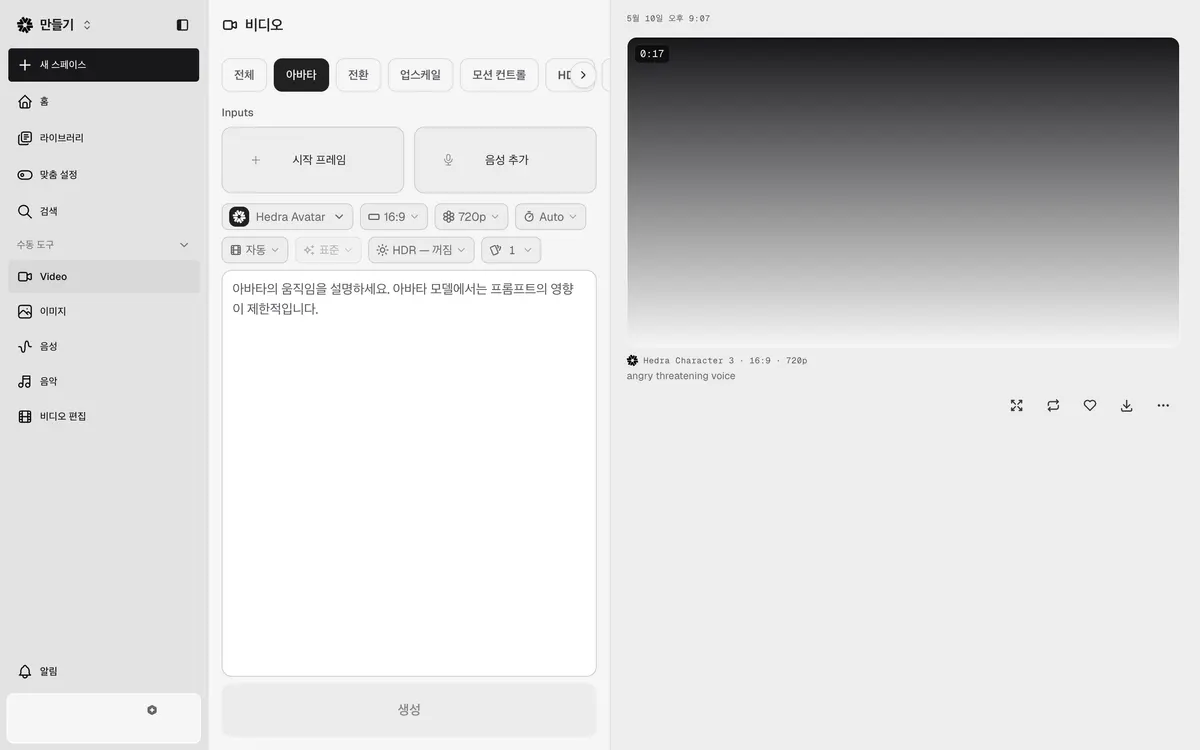
Below the two inputs are the generation settings. On October 22, 2026 the Avatar tab showed Hedra Avatar, 16:9, 720p and duration Auto. Auto means the video length follows your audio, so trim the audio rather than the video if you need a shorter clip. Choose 9:16 for vertical social clips or 16:9 for a presenter on a website or course, if your menu offers it.
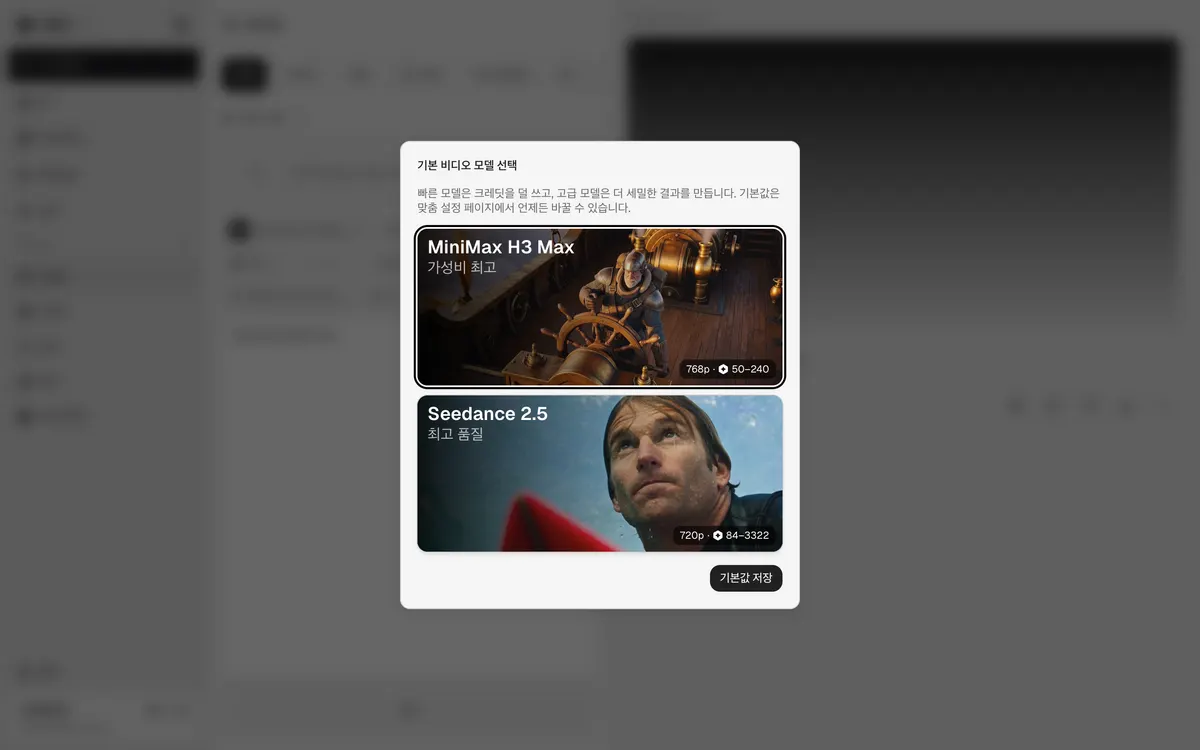
Hedra Studio default video model dialog, captured October 22, 2026
The model dialog above applies to the general video models on the All tab, not the avatar model. It is still a useful reference for credit budgeting: MiniMax H3 Max costs 50 to 240 credits per clip and Seedance 2.5 costs 84 to 3,322, depending on settings. Hedra's pricing FAQ says video credits are deducted by generated length, so a 10-second Character-3 clip is charged for 10 seconds.
Step 6. Add a short motion prompt (optional)
The prompt box in the Avatar tab says to describe the avatar's movement and warns that prompt influence is limited on the avatar model. Use it for mood and restraint, not for choreography. Hedra's Avatar page gives an example: 'gestures naturally, occasional smile, friendly and relaxed vibe'. Its Character 3 page suggests using the prompt to calm excessive gestures.
Step 7. Generate, review and download
Press Generate. Finished clips appear in the panel on the right with their model, aspect ratio and resolution, for example 'Hedra Character 3 · 16:9 · 720p'. The buttons under each clip enlarge, regenerate, favorite and download it. Watch the full clip before downloading and check the mouth and the hands, since gestures are the most commonly reported weak spot.
Hedra lip sync tips and fixes
Problem
Likely cause
What to change
Mouth looks soft or off-beat
Noisy or echoing audio
Re-record or clean the track; keep speech clear
Too many hand gestures
A known model tendency
Add a calm motion prompt such as 'minimal gestures, steady posture'
Face drifts between clips
Different source images
Reuse the same approved start frame for a series
Clip is longer than planned
Duration set to Auto
Trim the audio before generating
Wrong person speaks in a group image
No speaker position
Give one audio track per speaker and mark each position
Credits run out mid-project
Monthly credits do not roll over
Upgrade or buy a credit pack; packs do not expire
Hedra's own Character 3 page notes that users report 'overly dramatic or unnatural hand gestures'. A July 2025 user write-up on Character 3 found the gestures natural but 'a little too frequent', and noted that reflections on glasses held up well.
Is Hedra Character 3 free?
Hedra's official pricing page does not list a free plan. Its Studio tab shows paid monthly plans only, and its FAQ says that after cancelling you keep only limited watermarked generations. Hedra's talking avatar FAQ says commercial rights and unwatermarked output come with every paid plan, and Studio shows your remaining credits in the top right corner.
Studio plans on the official page are Basic $20/month (2,000 credits), Pro $50 (7,200), Ultra $100 (18,000) and Teams $75 (14,400), with custom Enterprise pricing. Our Hedra pricing breakdown covers the plan differences, and the Hedra AI review covers who each plan fits.
Hedra Character 3 API
Developers can call the model directly. Hedra's API page lists the model ID hedra-character-3 with a POST request to the v3 models endpoint and an API key header. Start frame and audio are required. Up to four audio files are accepted for multi-speaker scenes, with one speaker position per audio track. If you set a duration, the audio is trimmed or padded with silence to that length.
API billing is per second from a prepaid dollar balance, with no subscription or seats: 2.5¢ per second at 540p, 5¢ at 720p and 6.25¢ at 1080p. A 30-second 1080p clip is about $1.88 before retries. Hedra's Builder Program page notes that Studio subscription credits and API billing are separate.
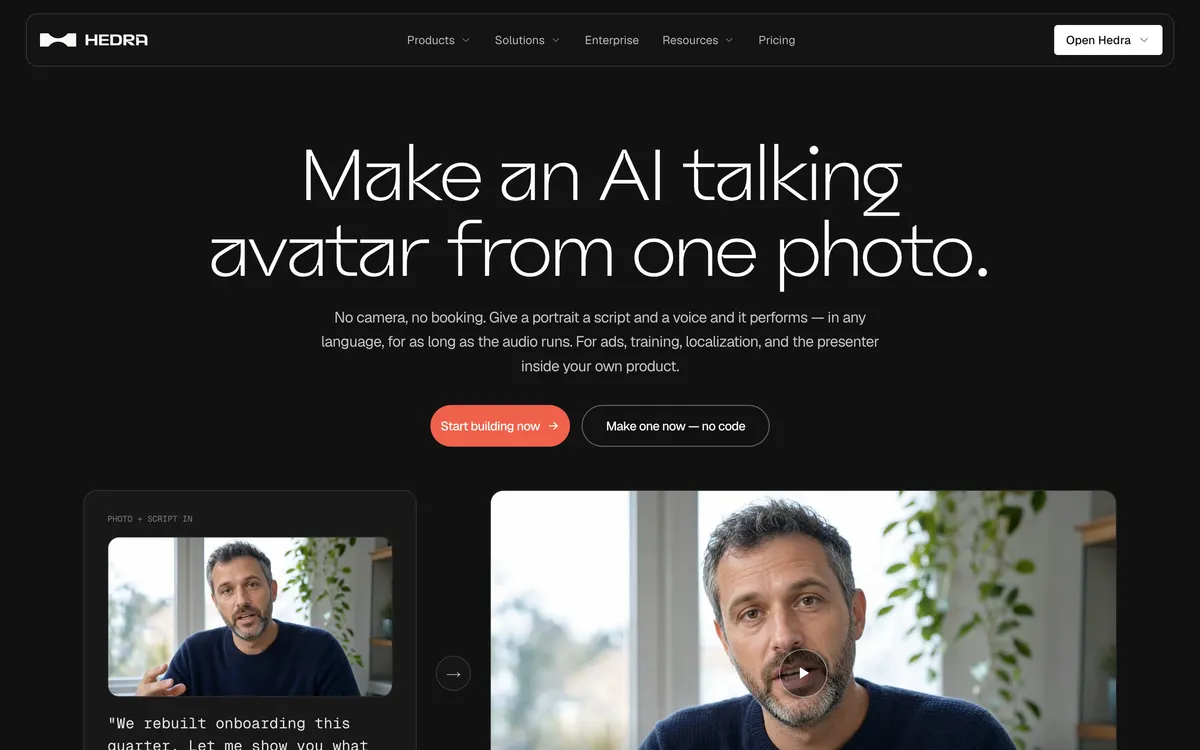
Hedra AI talking avatar page (official site, captured October 22, 2026)
Hedra's model pages list up to 10 minutes per generation, matching the API's 600-second audio limit. The video length follows the audio unless you set a duration.
Does Hedra lip sync work in other languages?
Yes. Hedra's lip sync page says the language is whatever is on the recording, not a setting. Its examples show English, Japanese and German.
Can two people talk in the same Hedra video?
Yes. Hedra's talking avatar FAQ says to pass one audio track per speaker and mark where each person sits in the frame. The API accepts up to four audio files with matching speaker positions.
Can I download Hedra Character 3 or run it locally?
Hedra's model pages offer Character 3 through Studio and a hosted API endpoint. They do not list a downloadable or open-source version. You download the finished videos, not the model.
Why does my prompt barely change the avatar?
Studio states that prompt influence is limited on the avatar model. The start frame and the audio drive most of the result, so change those first and keep prompts short.
Interface labels, prices and limits were checked on Hedra's official pages and in Hedra Studio on October 22, 2026 and may change.
Explore the available options
Confirm the final price, eligibility, and refund terms on the seller page before purchasing.
Hedra Pricing: Free Start and Plans from $20Compare Hedra pricing, free-start terms, monthly credits and commercial use across Basic, Pro, Ultra and Teams. Basic starts at $20/month.