Hedra AI Review 2026: What It Makes, Pricing, Who It Fits
Hedra AI review for October 2026: what Hedra Studio makes from one photo and audio, official plans from $20/month, credit rules, limits and who it fits.
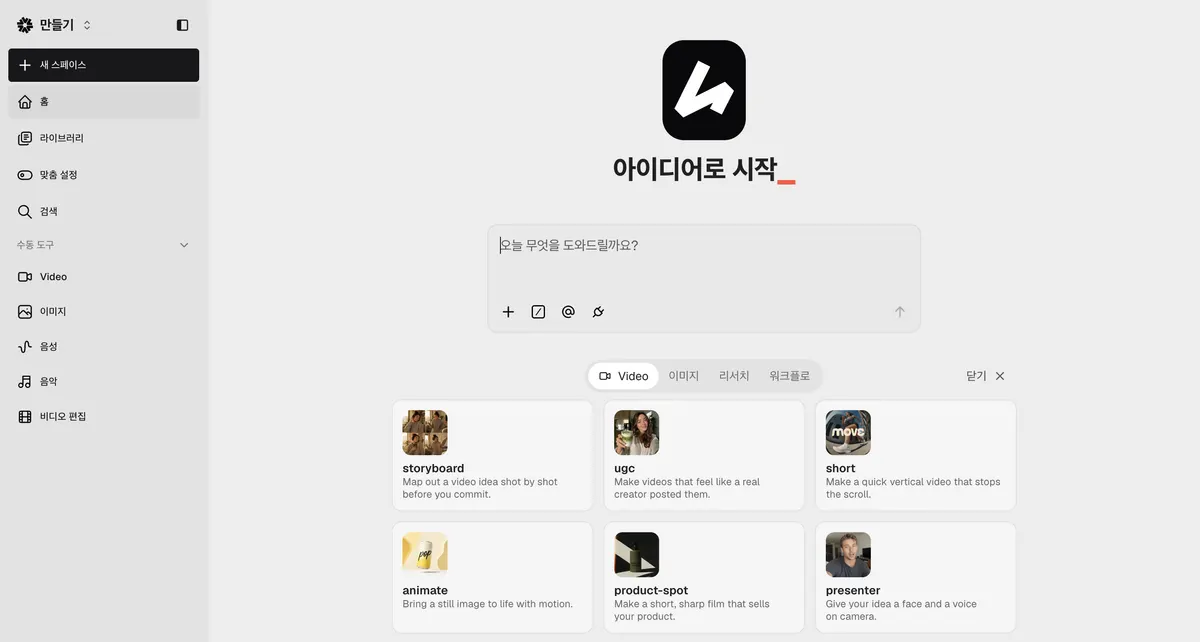
Hedra Studio home screen, captured October 22, 2026 (account details hidden) Hedra · Original browser screenshot for editorial demonstration
Recommended for these needs
View on the official site
Pick for talking avatar and lip sync video
Its own avatar models turn one photo and an audio track into lip-synced clips up to ten minutes, and the same credit balance covers other video, image and voice models.
Hedra AI is a video studio that turns a single photo and an audio track into a talking, lip-synced video, and it now also runs an agent workspace, image, voice and music tools, and a developer API from the same account. This review covers what Hedra makes today, what each Studio screen does, what the official pricing page lists as of October 22, 2026, and who should or should not pay for it.
Many pages that rank for Hedra still quote older plan prices or describe the 2024 version of the app. Everything below comes from Hedra's official pages and from Studio screens captured on October 22, 2026, with account details hidden. Fieldnotes did not run paid generation tests for this review, so quality notes are taken from Hedra's own model pages and dated user reports.
Quick answer
What it is: an AI video studio built around talking avatars and lip sync, plus an Agent workspace, other video models, image, voice and music tools.
Is it free: the official pricing page lists no free plan. Its Studio tab shows paid monthly plans from Basic at $20 (2,000 credits) up to Ultra, Teams and custom Enterprise.
Cost: Studio plans start at $20 per month (Basic, 2,000 credits). The API is pay-as-you-go from a prepaid balance.
Best fit: presenter clips, training explainers, character dialogue and localized versions of the same talking video.
What is Hedra AI used for?
Hedra is used to make a person or character talk on camera without filming. You give it a start frame (a portrait photo or a generated character) and a voice track, and the avatar model animates the mouth, face and head to match the audio. Hedra's talking avatar page describes the use cases as ads, training, localization and an on-screen presenter inside your own product.
The company has also widened its scope. The homepage now presents Hedra as an AI research lab with training, inference and GPU infrastructure, a Developer API with 'one API key for hosted image, video, audio, and language models', and Hedra Agent, described as 'an interactive workspace for multi-step image, video, and audio work'. For most readers searching 'hedra ai', the relevant product is Hedra Studio, the no-code app that runs those models.
Typical jobs people use it for:
A short product or course presenter clip that explains one feature.
Training and onboarding clips where the script changes often and re-shooting is not practical.
The same video in several languages, since lip sync follows whatever language is in the audio.
Illustrated or stylized characters, such as a podcast host or a mascot, that need to speak.
Hedra Studio tools, screen by screen
Home and Hedra Agent
Studio opens on a home screen with a prompt box ('Start with an idea' in the Korean interface shown in these captures) and template cards: storyboard, ugc, short, animate, product-spot and presenter. Each card describes the job, for example 'Give your idea a face and a voice on camera' for presenter and 'Map out a video idea shot by shot before you commit' for storyboard. The left menu lists Library, Search and the manual tools: Video, Image, Voice, Music and Video edit.
Video tool
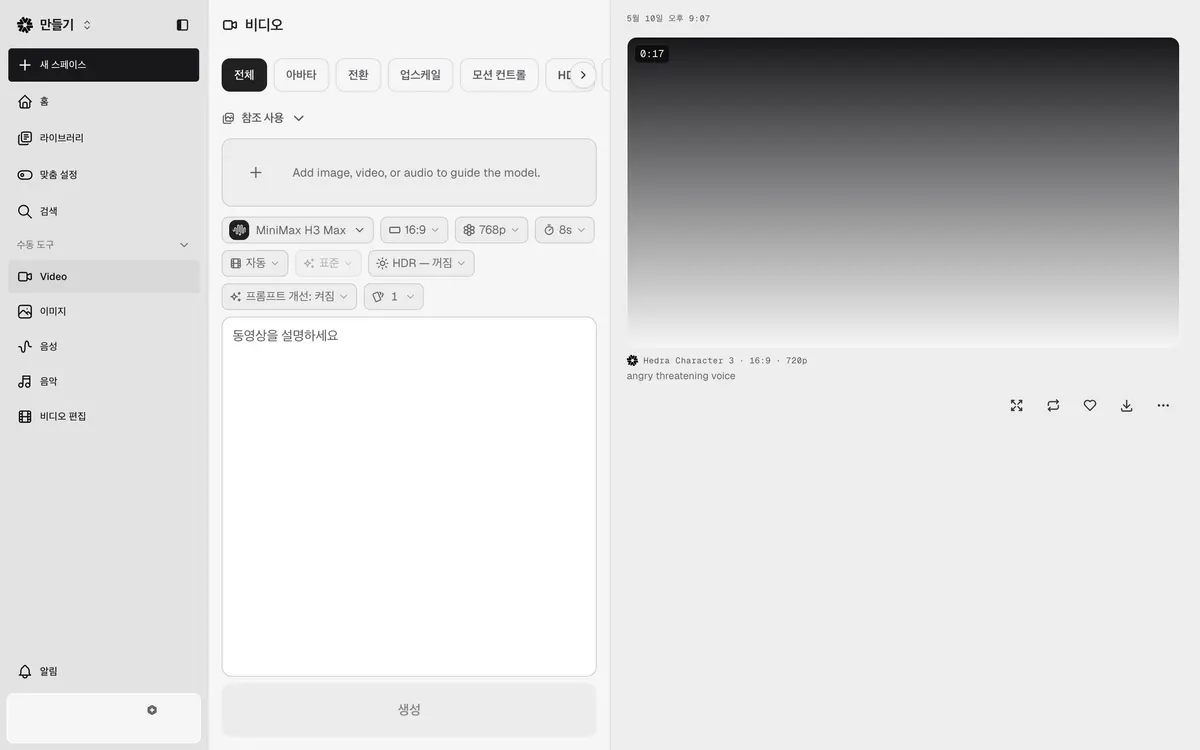
The Video tool has tabs for All, Avatar, Transition, Upscale, Motion control, HDR and Background removal. On the All tab you can attach an image, video or audio reference, pick a model, aspect ratio, resolution and length, and write a prompt. In the capture below, the default model is MiniMax H3 Max at 16:9, 768p and 8 seconds with prompt enhancement on. The previous output on the right is labeled 'Hedra Character 3 · 16:9 · 720p', with buttons to enlarge, regenerate, favorite and download.
Hedra Studio Video tool, captured October 22, 2026 (account details hidden)
Avatar tab: lip sync from one photo
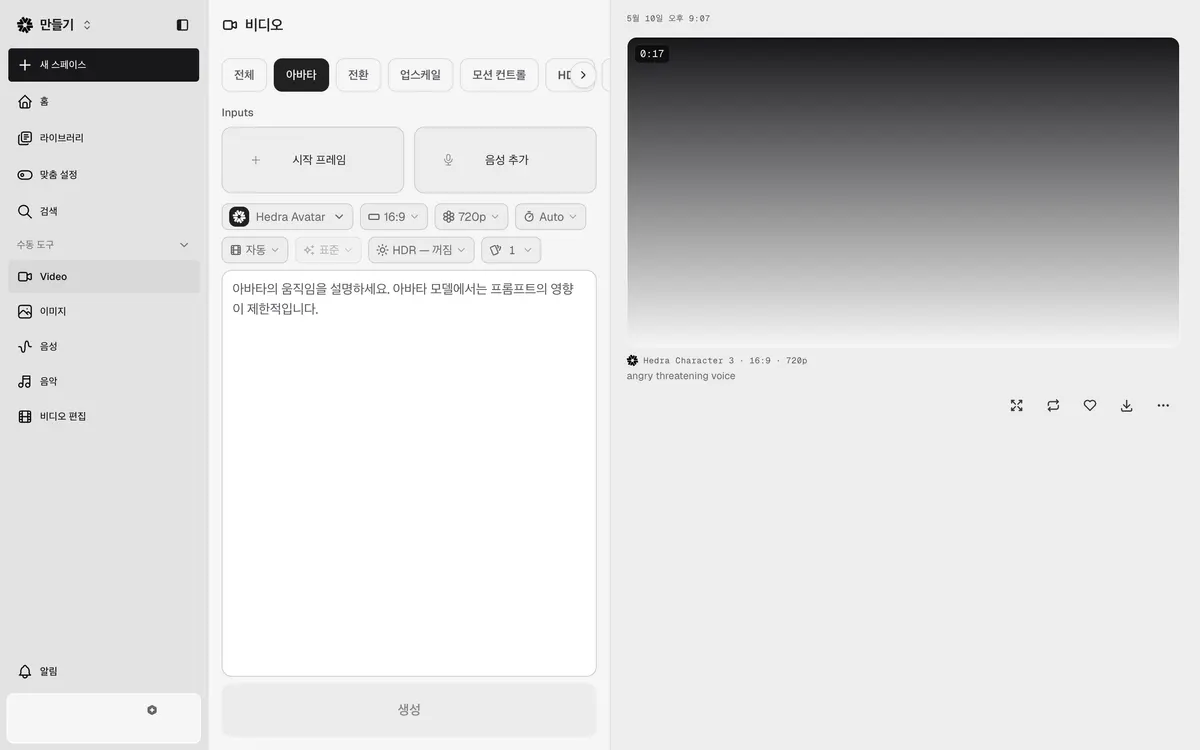
The Avatar tab is the core talking-video workflow. It has two inputs, Start frame and Add voice, and defaults to the Hedra Avatar model at 16:9, 720p with duration set to Auto, so the clip length follows the audio. The prompt field carries a warning worth reading: describe the avatar's movement, but prompt influence is limited on the avatar model. In practice, the photo and the audio drive the result far more than the text.
Hedra Studio Avatar tab, captured October 22, 2026 (account details hidden)
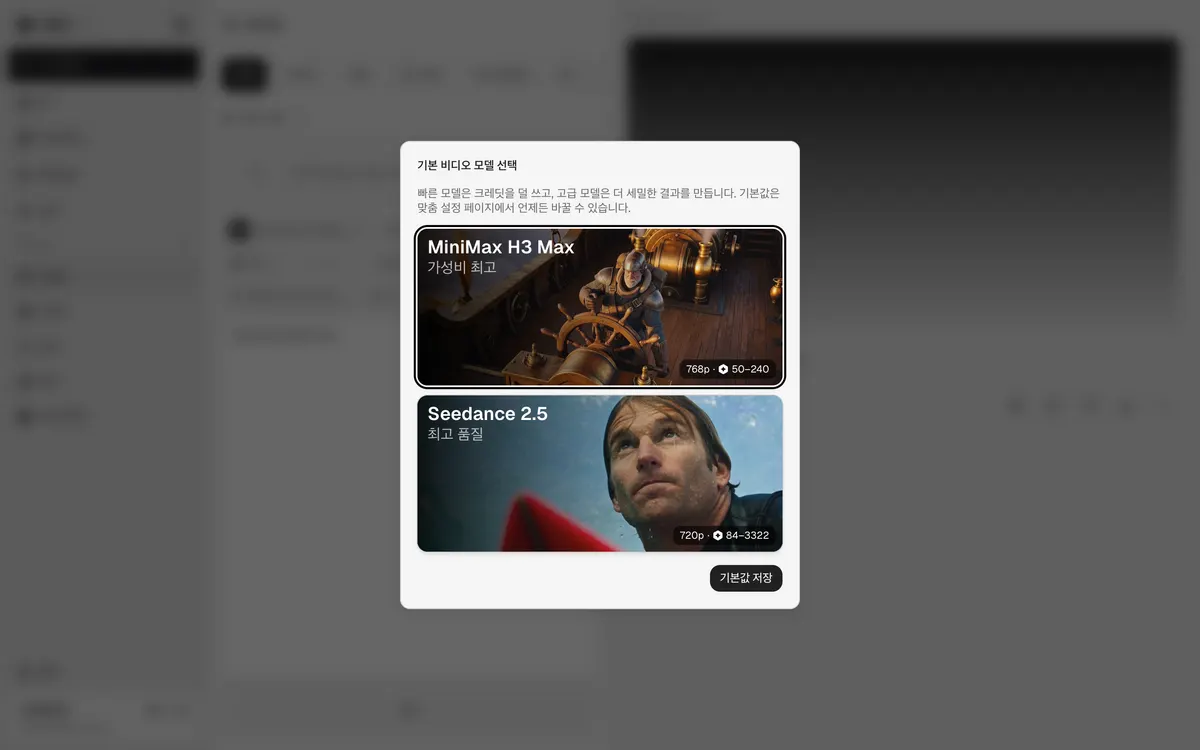
Studio is not limited to Hedra's own models. The default video model dialog offers MiniMax H3 Max, labeled best value at 768p and 50 to 240 credits, and Seedance 2.5, labeled best quality at 720p and 84 to 3,322 credits. The dialog explains that fast models use fewer credits and advanced models produce finer results, and that the default can be changed later in preferences.
Hedra Studio default video model dialog, captured October 22, 2026
Hedra AI pricing in October 2026
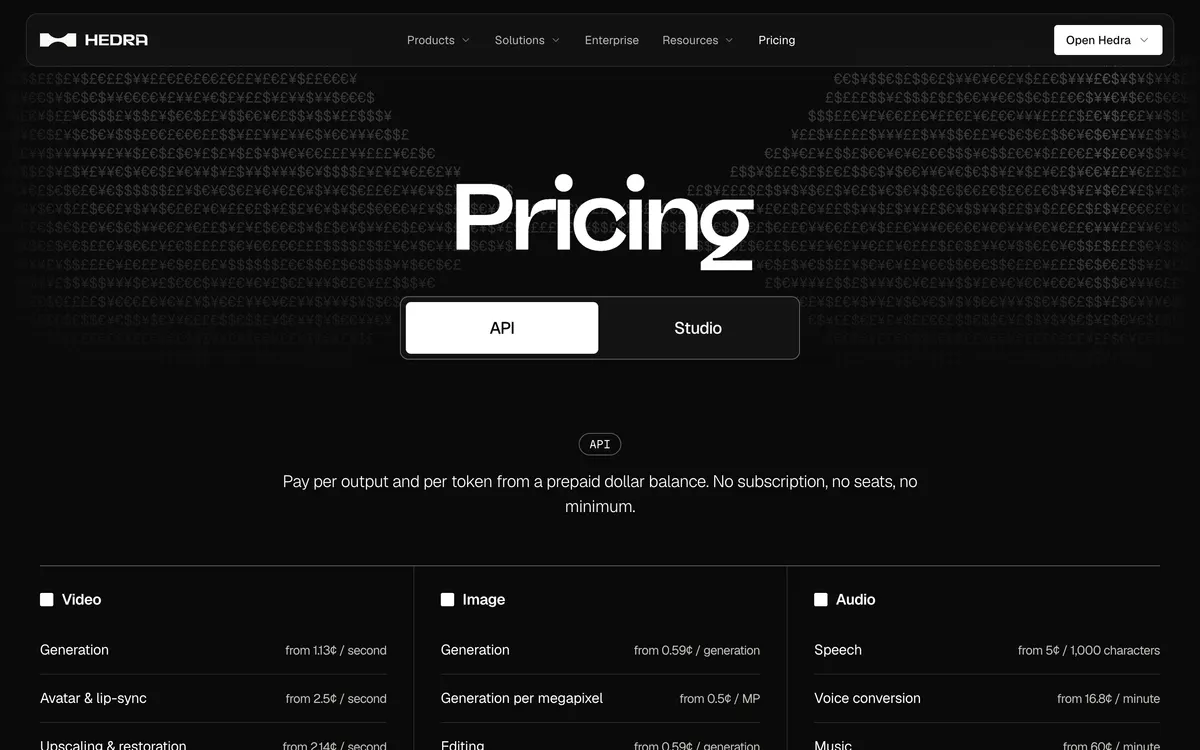
Hedra's pricing page has two tabs. The Studio tab lists paid monthly subscription plans with credits, from Basic at $20 up to Ultra, Teams and Enterprise, with no free plan card, and the API tab lists usage-based rates paid from a prepaid dollar balance. Hedra's Builder Program page states that Studio subscription credits and API billing are separate, so pick the one that matches how you will work.
Option
Listed price
Monthly credits
Listed features
Basic
$20/month
2,000
Slower generations, commercial use
Pro (marked Popular)
$50/month
7,200
Faster generation, commercial use
Ultra (marked Best value)
$100/month
18,000
Fastest generation, commercial use, allowances up to 57,600 credits/month, Teams plan access
Teams
$75/month
14,400
Fastest generation, commercial use, Teams plan access
Avatar and lip-sync from 2.5¢ per second; no subscription, seats or minimum
Several third-party reviews still list a $15 Basic plan. The official page checked on October 22, 2026 lists Basic at $20 with 2,000 monthly credits, which matches the figures in our Hedra pricing breakdown from September 29, 2026.
Hedra official pricing page, API tab with video, image and audio rates (official site, captured October 22, 2026)
How Hedra credits work
Billed by length: credits are deducted by generated video length. Hedra's own example: a 10-second Character-3 video is charged as 10 seconds, not a full minute.
No rollover: monthly subscription credits reset at the start of each billing cycle.
Credit packs do not expire: pack credits are used only after monthly credits run out, and they roll over.
Cancelling: you lose most functionality apart from limited watermarked generations, and you need to resubscribe to use remaining pack credits.
As rough arithmetic, 2,000 Basic credits cover about 8 clips at the top of the MiniMax H3 Max range (240 credits) or about 40 at the bottom (50 credits). Seedance 2.5 clips can use far more. Check the credit estimate in Studio before each generation and count retries in your budget.
On the API side, the Hedra Character 3 and Hedra Avatar model pages both list 2.5¢ per second at 540p, 5¢ at 720p and 6.25¢ at 1080p. A 60-second 720p avatar clip at that rate is $3.00 before any retries.
Is Hedra free to use?
The official pricing page does not list a free plan. Its Studio tab shows only paid monthly plans, from Basic at $20 for 2,000 credits up to Ultra, Teams and custom Enterprise, and the API tab is pay-as-you-go from a prepaid balance. The pricing FAQ adds that if you cancel, you lose most functionality apart from limited watermarked generations. Any free allowance you see quoted elsewhere is not confirmed by Hedra's current pricing page.
Hedra's talking avatar FAQ says commercial use is available 'on a paid plan', and that commercial rights and unwatermarked output come with every paid plan.
Commercial use and likeness rights
All five paid tiers on the pricing page list commercial use. The rights question that matters more is the face and voice you upload. Hedra's lip sync page tells users to send only faces and voices they have the rights to use. If you animate a real person, get written permission for both the image and the voice, and keep it with the project files. Illustrated or generated characters avoid most of that work.
Limits to know before you pay
The prompt is a weak control on avatars. Studio itself says prompt influence is limited on the avatar model. Hedra's Character 3 page suggests using the prompt mainly to calm excessive gestures.
Audio quality decides lip sync quality. Hedra's model pages ask for clean speech without heavy background noise or reverb.
Gestures can overshoot. Hedra's own Character 3 page notes user reports of overly dramatic hand gestures. A July 2025 user write-up described gestures as natural but 'a little too frequent'.
Credit cost varies widely by model. The model picker ranges from 50 to 3,322 credits per clip, so a plan's credit total does not translate into a fixed number of videos.
Is Hedra any good? Who it fits
Hedra is a strong pick if your video starts with a face and a voice track. Its own models are built for that job: Hedra lists up to ten minutes per generation for its avatar models, seven aspect ratios including 9:16, 1:1 and 21:9, and output up to 1080p on the model pages. Having other video models in the same credit balance is useful when a presenter clip also needs B-roll or a product shot.
Use Hedra if you:
Need talking presenter, explainer or training clips from a photo and a script.
Localize the same message into several languages with matching lip movement.
Want illustrated or animal characters that speak to camera, like the examples on Hedra's Character 3 pages.
Prefer one account for avatar video plus general video, image and voice generation.
Skip or wait if you:
Need precise, frame-by-frame control of gestures from text prompts.
Cannot get consent to use a real person's face or voice.
Need a guaranteed number of finished videos per month for a fixed budget.
How to start with Hedra Studio
Open Hedra Studio, create an account and choose a Studio plan (from $20 per month).
Go to Video, then the Avatar tab. Add a clear, front-facing portrait as the Start frame.
Click Add voice. Hedra's talking avatar page lists four voice sources: type a script and pick a voice, clone a voice from a sample you own, record, or upload audio. Then press Generate.
If you only have a photo and want a quick talking clip, our talking photo AI guide covers source photo choice and consent in more detail.
No free plan is listed on the official pricing page. Its Studio tab shows paid plans starting at $20 per month (Basic, 2,000 credits), and after cancelling only limited watermarked generations remain. Paid plans include commercial rights and unwatermarked output.
What does Hedra cost?
Studio plans are Basic $20/month (2,000 credits), Pro $50 (7,200), Ultra $100 (18,000) and Teams $75 (14,400), with custom Enterprise pricing. The API is billed per second or per output from a prepaid balance, with avatar and lip-sync from 2.5¢ per second.
What is Hedra AI used for?
Mainly for talking avatar and lip-synced videos made from one image and an audio track: presenters, training clips, character dialogue and localized versions. Studio also includes general video, image, voice and music generation and an Agent workspace.
Is Hedra any good for lip sync?
For talking-head work it is the product's main strength, and it supports talking and singing video up to ten minutes per generation on its avatar models. Results depend on a clean portrait and clean audio, and hand gestures can be more active than you want.
Does Hedra have an API?
Yes. The Developer API runs hosted image, video, audio and language models behind one key, billed from a prepaid dollar balance with no subscription or seat fee. API billing is separate from Studio subscription credits.
What is Hedra Character 3?
Character 3 is Hedra's image-to-video lip sync model, released in March 2025 as the successor to Character 2. Studio's Avatar tab now defaults to a model named Hedra Avatar, and both appear on Hedra's model pages.
Prices, plans and features were checked against Hedra's official pages on October 22, 2026 and may change. Taxes and currency can affect the checkout total.
Explore the available options
Confirm the final price, eligibility, and refund terms on the seller page before purchasing.
Hedra Pricing: Free Start and Plans from $20Compare Hedra pricing, free-start terms, monthly credits and commercial use across Basic, Pro, Ultra and Teams. Basic starts at $20/month.