Genspark Second Brain: How to Set It Up and What It Costs
If you search for Genspark Second Brain, most of page one is about a card-sized voice recorder. That device is the SecondBrain Note. The thing most people actually want to set up is SecondBrain, the software memory inside Genspark that lets Super Agent, AI Slides and the other agents draw on your own files, emails and meeting notes.
This guide covers the software first: what to connect, what to upload, how it uses credits, and what it did for me when I loaded my own knowledge base into it. The device gets its own section, because you do not need it to start.
Quick answer
Do you need the Note device? No. Genspark's help center says SecondBrain works fully without it. The Note is an optional recorder for meetings and phone calls.
Fastest start: connect one source, such as Gmail, Google Calendar or a file upload, then ask Super Agent a question about your own work.
Bringing an existing note library: upload Markdown, PDF, CSV or HTML files, or a Notion export as a .zip (up to 1 GB).
Cost: on Plus and Pro, SecondBrain in Standard mode is covered by the weekly Free Quota. Ultra mode and long chats use more credits.
Genspark Second Brain vs SecondBrain Note
The two names are close, and search results mix them up. Here is the difference, based on Genspark's two help articles and the official shop page.
SecondBrain (software)
SecondBrain Note (hardware)
What it is
A personal memory layer that Super Agent and other Genspark agents can read
A card-thin voice recorder that attaches to your phone with a magnetic holder
What goes in
Past Genspark projects, AI Meeting Notes, connected apps, uploaded files
In-person meetings, memos and phone calls, which become notes inside SecondBrain
Required?
Yes, this is the product
No, it is one optional input
Price
Part of a Genspark account; usage draws on Free Quota or credits
$179 on the official shop, marked down from $199
Included usage
Standard mode covered by Free Quota on Plus and Pro
300 transcription minutes per month without a subscription; about 5 credits per minute after that
Limits to know
500 MB per upload, 1 GB for a Notion export
Up to 35 hours of continuous recording on a full charge
If you already record meetings with the app's built-in AI Meeting Notes, those notes feed SecondBrain without any device.
How to set up Genspark Second Brain
Here is the setup, based on the help center quick start and its FAQ.
Open SecondBrain from the Genspark home page or its own page at genspark.ai/second-brain/home.
Connect at least one data source. Click Connect next to a tool and approve access. Gmail, Google Calendar, Outlook, Slack, Notion, HubSpot, Salesforce, Google Workspace and Microsoft 365 are on the supported list.
Wait a few minutes. Some integrations sync on a schedule, not instantly. If data is still missing, disconnect and reconnect the source.
Go back to the home page and ask Super Agent something only your data can answer, such as "Summarize last week's meetings into a weekly report."
Genspark also saves your past Genspark activity, including AI Meeting Notes, into SecondBrain automatically. So if you have used Genspark for a while, it is not empty on day one.
What files you can upload
Direct uploads accept .md, .csv, .html, .pdf and .zip files. Office documents, ODF, RTF and EPUB files need to go inside a .zip, and SecondBrain converts them when it reads the archive. Each upload can be up to 500 MB.
Uploaded files live in SecondBrain's own storage. They do not show up in AI Drive, so do not look for them there.
Genspark Second Brain and Notion
There are two routes. You can connect Notion as a live integration, or you can export your workspace from Notion and upload the export as a .zip. The export route allows up to 1 GB, which is double the normal upload limit, and it is the simpler choice for a large archive you do not edit often.
What I uploaded and how I structured it
Before Genspark shipped SecondBrain, I had already built my own knowledge system with Claude Code. It turned years of lecture decks, recordings and social posts into Markdown knowledge cards with a one-line index on top. I wrote up that build on my Substack.
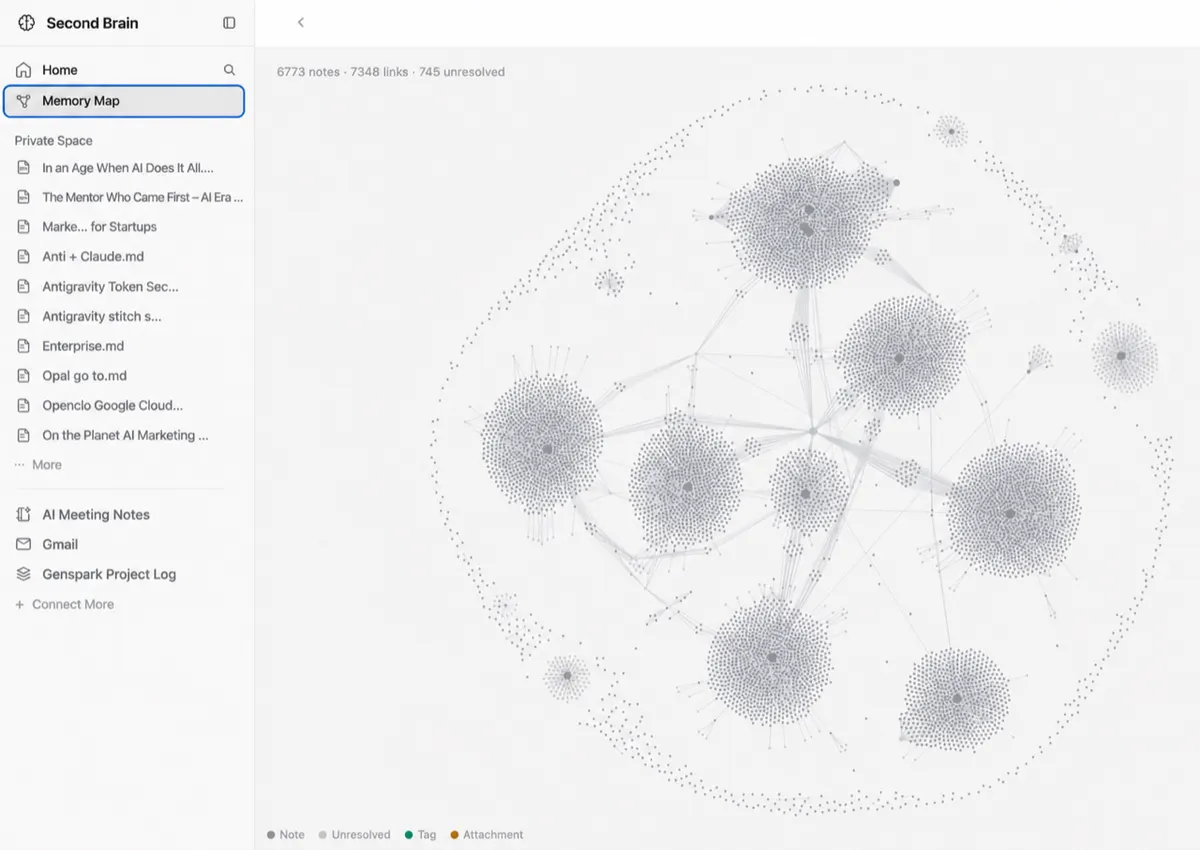
For Genspark, I did not rebuild anything. I uploaded those Markdown knowledge files into SecondBrain, and that was the whole setup. I did not tune prompts or retrieval rules. The memory map at the top of this page is my account afterward: 6,773 notes and 7,348 links, grouped into clusters.
My files already followed two habits from that card system. I would keep both for any note library you upload:
One topic per file. Short, focused Markdown files give the agent clean pieces to pull, instead of one long document it only half reads.
A summary line at the top of each file. A title and a one-sentence summary make it easier for search to land on the right file when you phrase a request differently.
The trade-off: loading a large library this way used a lot of credits. I accepted that cost, but plan for it if you are on a smaller credit tier.
A real example: a company deck from SecondBrain
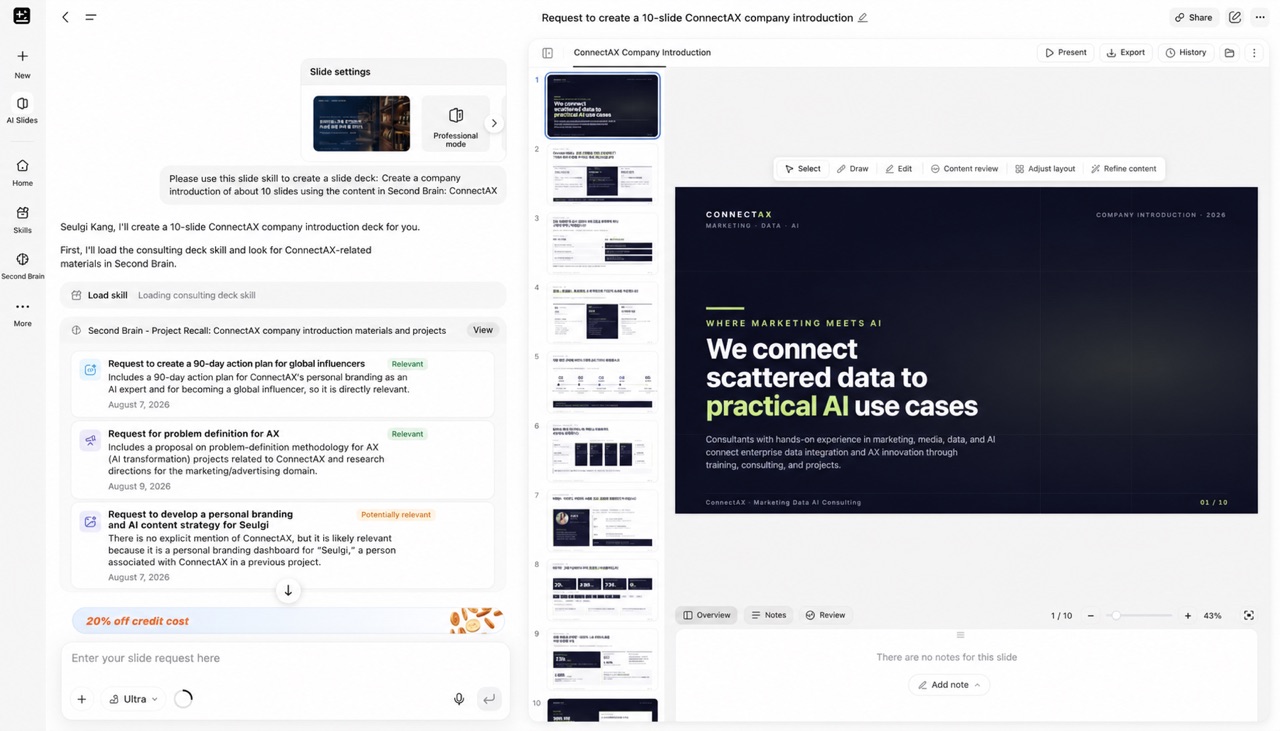
The payoff shows up in the other agents. In AI Slides, I asked for a company introduction of about 10 slides "using the content in Second Brain: ConnectAX", my consulting business. The agent loaded my slide skill, ran a SecondBrain project recall, and listed which past materials it judged relevant before writing.
AI Slides pulls past ConnectAX materials from SecondBrain and marks each one as relevant or potentially relevant before it builds the deck.
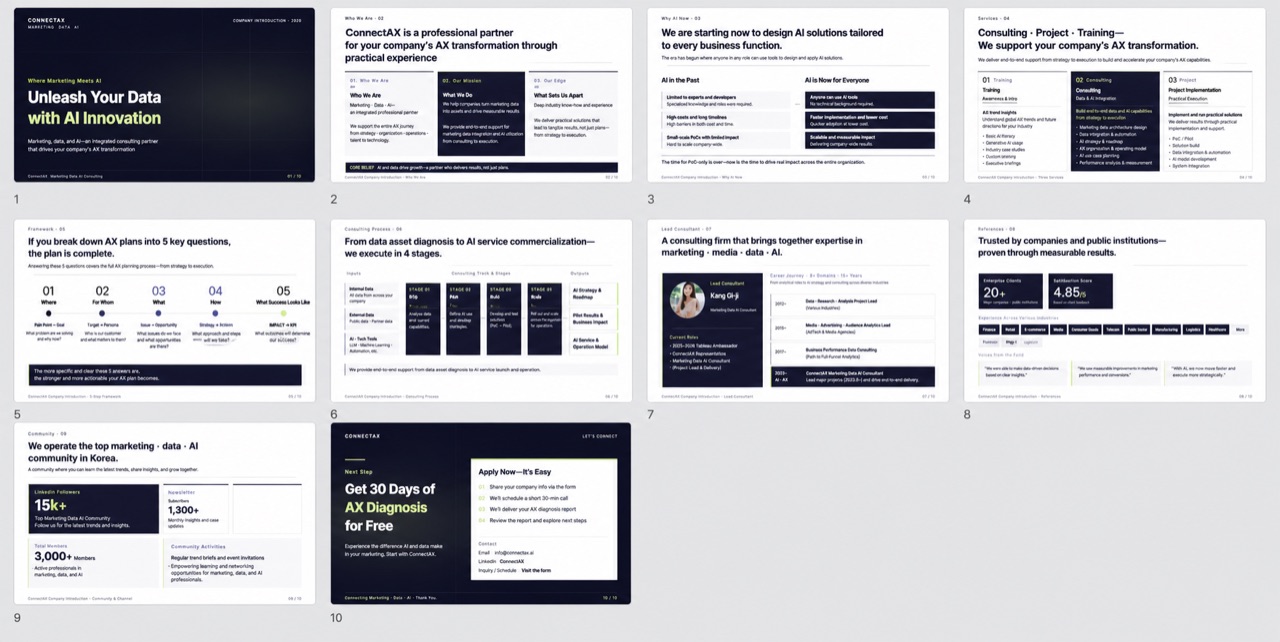
The result was a full 10-slide deck built from my own services, numbers and case material, not generic filler about AI consulting.
The 10 slides AI Slides produced from SecondBrain context. Check every figure before you send a deck like this.
If you build decks this way, try it on one real request first. Then review names, numbers and dates line by line. The agent is drawing on your files, but it can still combine them in the wrong way.
SecondBrain does not have its own price tag. It uses your Genspark plan.
Free plan: 100 credits per day, up to a lifetime allowance. Free Quota is a Plus and Pro benefit, and the plans page does not say whether the Free plan includes SecondBrain. Check access in your own account.
Plus: $24.99 per month, or $19.99 per month billed annually at $239.99. Starts at 10,000 monthly credits plus a weekly Free Quota.
Pro: $249.99 per month, or $199.99 per month billed annually. Starts at 125,000 monthly credits and a weekly Free Quota 10 times the Plus balance.
On Plus and Pro, the Free Quota covers SecondBrain in Standard mode at no credit cost. A blue bar above the composer reads "Using free quota at no credit cost" when a task is covered. When the weekly balance runs out, tasks switch to your credits and keep running.
Genspark's own advice for spending less in SecondBrain:
Use Standard for everyday questions and save Ultra for answers where quality matters most. My deck example above ran on Ultra.
Start a new chat when you change topics. Each reply costs a little more as a conversation grows.
Privacy: what Genspark says and what I keep out
According to the help center, SecondBrain data is accessible only to you, each integration needs your explicit authorization, and you can disconnect any source from the home page at any time. Genspark states it holds SOC 2 Type II and ISO 27001 certifications.
Even so, I would treat it like any cloud tool that reads your inbox. Connect the sources you need for real tasks, not everything at once. Keep other people's personal data, client contracts and credentials out of uploads unless your company has approved that use. If you use the Note recorder, recording laws differ by country and U.S. state, and some require consent from everyone in the conversation.
Is Genspark Second Brain worth it?
It fits best if you already have a body of material, such as notes, decks, a Notion workspace or meeting records, and you produce documents or decks inside Genspark. The value is not search. It is that every agent starts from your context, so you stop pasting background into prompts.
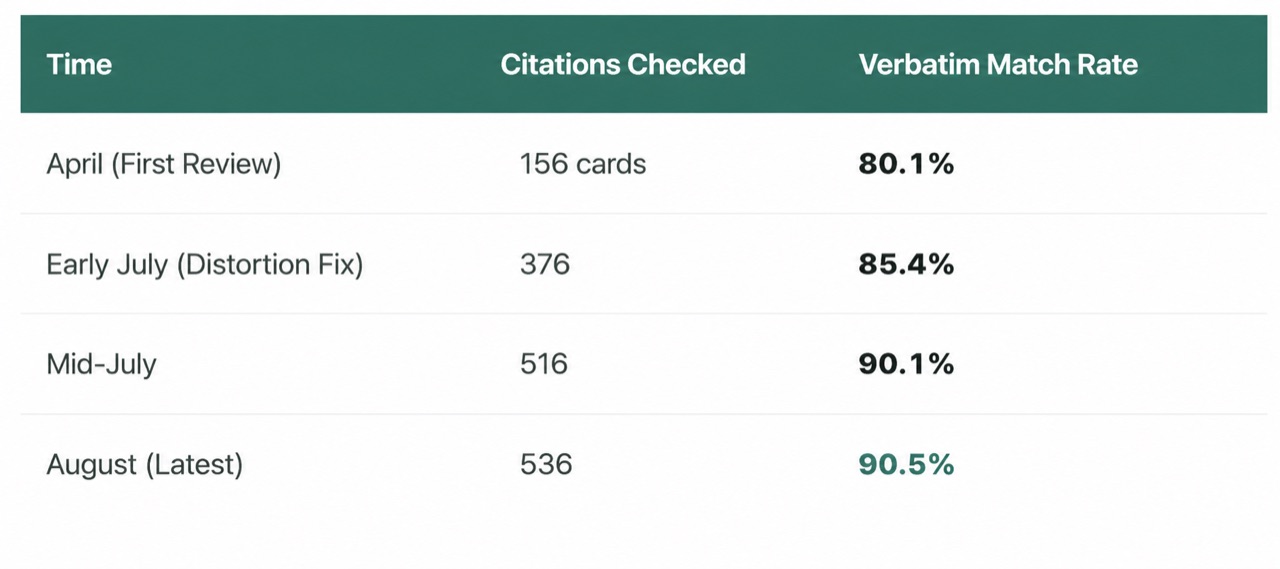
It fits less well if you need tight control over exactly which sentence gets quoted. My Claude Code system has a citation check built in, and I raised its verbatim match rate step by step over several months. Genspark gave me good output with no tuning, but it does not expose that kind of control.
My separate Claude Code knowledge system: the citation match rate took months of tuning. SecondBrain skips that work, with less control.
My rule of thumb: start with SecondBrain if you want results this week. Build your own system only if exact citations are part of the job.
FAQ
Do I need the SecondBrain Note to use Genspark Second Brain?
No. SecondBrain is the software memory, and it works with connected apps, file uploads and the in-app AI Meeting Notes. The Note is an optional recorder for in-person meetings and phone calls.
Can I import my Notion workspace into Genspark Second Brain?
Yes. Connect Notion as an integration, or upload a Notion export as a .zip. The export can be up to 1 GB.
Is Genspark Second Brain free?
It is not sold separately. It runs on your Genspark plan. Genspark's plans page lists SecondBrain under the weekly Free Quota for Plus and Pro, which covers Standard mode at no credit cost. The page does not say whether the Free plan includes SecondBrain.
Does the SecondBrain Note need a Genspark subscription?
No. Each Note includes 300 transcription minutes a month. After that, processing uses about 5 credits per minute, and paid members get unlimited meeting notes, up to 24 hours a day.
Where are my uploaded files stored?
In SecondBrain's own storage, separate from AI Drive. Uploaded files will not appear in your AI Drive.
Bottom line
Set up the software first. Connect one or two sources, upload a small, well-labeled set of your own files, and run one real task in AI Slides or Super Agent. Buy the Note only if in-person meetings or calls you need to record are a big part of your week.
Prices, plan details and device pricing were checked on October 22, 2026 and may change.
Explore the available options
Confirm the final price, eligibility, and refund terms on the seller page before purchasing.