AI-generated illustration of a home recording setup for voice conversion. It does not show any specific product tested for this article. Genspark AI Image (Nano Banana Pro) · AI-generated editorial image
You already have the recording. Maybe it is a voiceover, a character line, or a podcast segment, and you want it to come out in a different voice. The search results for this job are mostly tool landing pages, and each one promises a free voice changer. What they rarely put side by side is the limit that actually stops you: a clip-length cap, a download block, a daily credit, or a license that does not cover monetized work.
This guide compares six ways to change the voice on pre-recorded audio: ElevenLabs Voice Changer, Canva's voice changer, the Voice.ai online upload tool, Kits AI, Applio, and Voicemod (the live option, for contrast). Product pages, pricing tables, help articles, terms, and repositories were checked on 2026-09-28. I did not run a controlled listening or latency test, so this is a workflow and licensing comparison, not a claim that one model sounds best.
Quick answer. For commercially publishable recorded dialogue or an API, use an ElevenLabs paid plan. For a single short clip at no cost, the Voice.ai upload tool (15-second clips) or Canva (one credit a day) can work. Use Kits AI to test music-oriented conversion, knowing its Free plan has no download minutes. Choose Applio if local control matters more than setup time. If the audio has to be live, Voicemod is the better fit.
Voice changer for pre-recorded audio: comparison at a glance
Tool
Best fit
What free really includes
Main limit to check
Commercial-use note
ElevenLabs Voice Changer
Recorded speech-to-speech, multilingual production, API
About 10 minutes per month on the web Free plan
5 minutes maximum per conversion segment
Free output is non-commercial and must carry attribution when published; paid plans include a commercial license subject to terms
Canva voice changer
One short edit inside a video project
One credit a day
15MB file size; only MP4 video download was confirmed on the feature page
No tool-specific commercial terms were found on the feature page
Voice.ai online upload tool
Very short clips and quick tests
Unlimited conversions after registration
Up to 15 seconds per clip (MP3, WAV, FLAC)
No commercial terms were stated on the tool page
Kits AI
Singing and spoken-vocal experiments
15 conversion minutes, 0 download minutes
No finished download on Free
Terms grant personal and commercial use of custom-model output if you hold the input rights
Applio
Local, open-source voice conversion
No subscription fee; you supply the computer, models, and setup time
Installation and your own hardware
The app is MIT licensed, but each voice model and source recording needs separate rights clearance
Voicemod
Live gaming, Discord, calls, streaming
Rotating voices, a permanent clean-mic effect, one soundboard
Built around a live virtual microphone
Terms frame Voicemod content as personal and non-commercial, with a carve-out for creator monetization on social networks
Two different kinds of "free" sit in this table. Canva and the Voice.ai tool let you finish a file at no cost but cap the file itself. ElevenLabs and Kits AI give you enough room to evaluate a workflow, but the free tier either restricts publishing (ElevenLabs) or blocks the download (Kits AI).
What ElevenLabs Voice Changer actually does
ElevenLabs calls the feature speech-to-speech. You record through a microphone or upload an MP3, WAV, or AAC file, choose a target voice, adjust the settings, and generate a new track. The system is designed to keep the timing and performance of the source, including accents and cues such as whispers, laughs, and cries. That makes it different from text-to-speech: you supply the acting, not only the words.
The product FAQ and the capability documentation both list 29 supported languages for the speech-to-speech model. The same product page also carries a broader "70+ languages" headline. I would plan around 29 for voice changing until the two are consistent.
Each conversion segment can be up to five minutes, so longer recordings need to be split. On the API, the default output is 128 kbps MP3 at 44.1 kHz; 192 kbps MP3 requires Creator or above, and 44.1 kHz PCM or WAV requires Pro or above. Developers can call the speech-to-speech endpoint with a target voice ID, model, voice settings, optional background-noise removal, and an output format.
The free plan is a test tier, not a commercial license
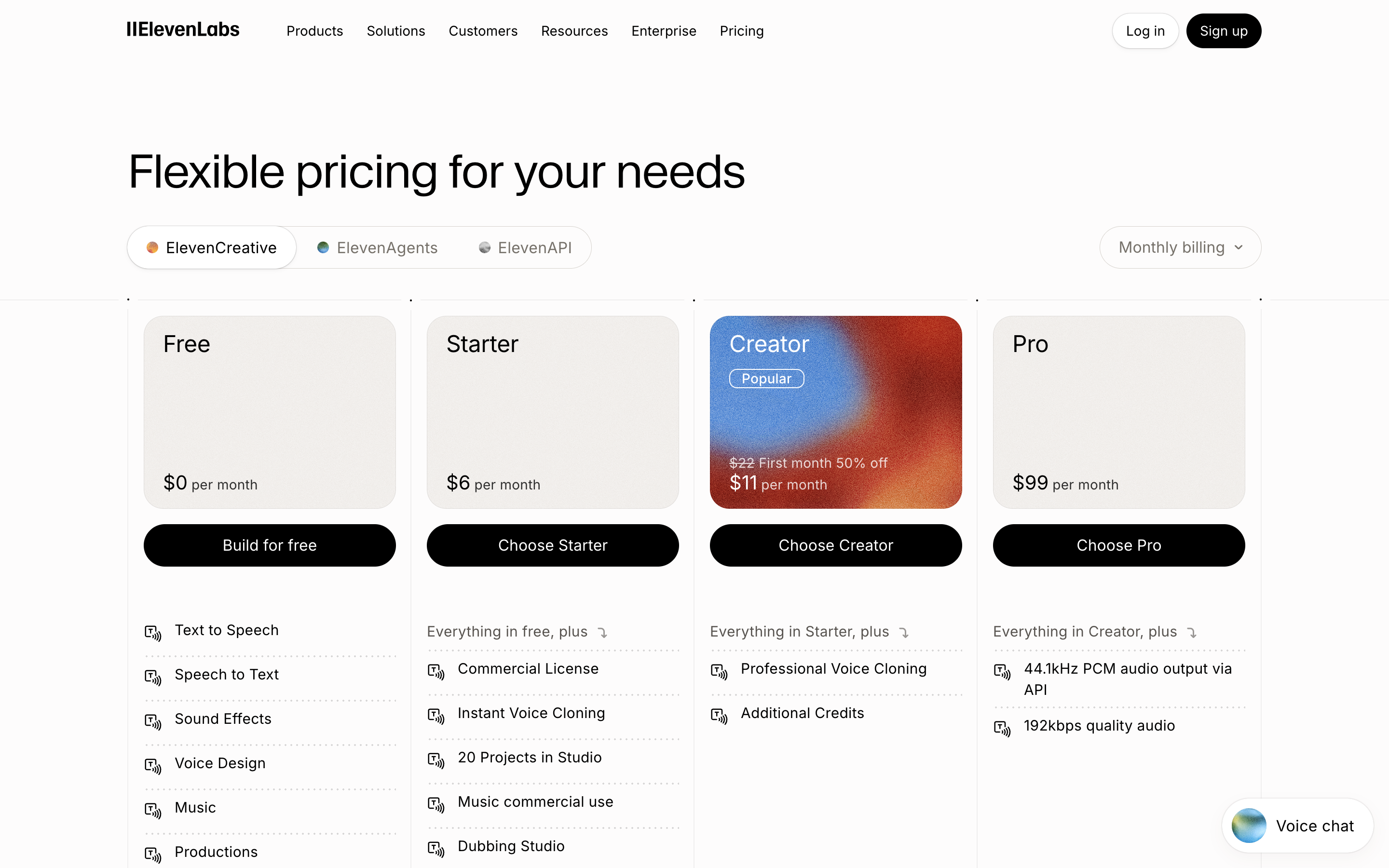
The current web pricing lists Free at $0 with 10,000 monthly credits, which the Voice Changer page presents as about 10 minutes. Starter is $6 a month with 30,000 credits. Creator is $22 a month, currently shown as $11 for the first month, with 121,000 credits. Pro is $99 with 600,000 credits. The pricing FAQ puts Voice Changer at 1,000 credits per minute, and those credits are shared with other ElevenLabs products, so the minute figures are estimates.
Official pricing page, captured on 2026-09-15. The plan prices shown were re-checked on 2026-09-28 and had not changed.
The separate API pricing page works in dollars: it lists Voice Changer at $0.12 per processed minute and shows 8.3 included minutes in its Free or pay-as-you-go view, 50 on Starter, and 183 on Creator. Do not treat the web plan's 10 minutes and the API table's 8.3 minutes as the same allowance.
The bigger limit is licensing. ElevenLabs states that the free plan does not include a commercial license and cannot be used for any commercial purpose. If you publish free-plan output, you must attribute it by including "elevenlabs.io" or "11.ai" in the title. Paid plans include a commercial license, provided you have rights to the input and voice and follow the terms and prohibited-use policy. For a monetized channel, client video, ad, course, or paid podcast, Starter at $6 is the current entry point.
If that recorded-production workflow fits your project, compare the current Voice Changer plans on the official siteAffiliate link: Fieldnotes earns a commission if you purchase through this link.. No reader-only discount is attached to this link; the Creator first-month price above is the public offer shown to everyone on the pricing page.
Two free upload tools that show up in search, and their hard limits
Canva voice changer: one credit a day
Canva's feature page says you can upload an audio or video file in MP3, M4A, WAV, or MP4 format, with a maximum file size of 15MB. Its free allowance is stated as one credit a day, with a top-up for unlimited usage and more voice types. The page describes downloading the result as an MP4 video. I could not confirm an audio-only export or a watermark policy from the feature page, so test one short file before building a workflow around it.
Canva makes sense when the voice change is one step inside a video you are already editing there. It is a weak fit for a folder of narration files, because one credit a day is a daily ceiling, not a batch allowance.
Voice.ai online tool: 15-second clips
The Voice.ai online voice changer accepts an uploaded file or a microphone recording and lets you download the converted audio. Supported formats are MP3, WAV, and FLAC, up to 15 seconds per clip, and the page describes unlimited voice conversions free of charge after registration. Fifteen seconds is enough for a sound bite or a quick character test, not for a voiceover.
Keep the product lines separate. Voice.ai's subscription pricing page covers a broader platform of voice agents, text-to-speech, and cloning. Those credit plans are not the price of this 15-second upload tool, and the tool page does not state commercial-use terms.
Voicemod wins when the audio has to be live
Voicemod solves a different problem. It creates a virtual microphone for Discord, games, live streams, and calls. The Free version gives you a rotating set of voice options, a permanent clean-mic effect, and the ability to create one soundboard. The full product advertises more than 200 Voicemod-crafted voices.
The licensing picture is narrower than "free to use anywhere." Voicemod's terms describe its content as for personal, non-commercial use, except for monetization generated by content creators through social networks and social media. Community content is limited to personal, non-commercial use. A streamer earning platform revenue may fall inside that carve-out; a client ad or a paid course is a different case, so check the exact voice and sound assets before using them.
Kits AI is close in workflow, but Free blocks finished exports
Kits AI converts spoken or sung audio, accepts MP3 and WAV vocal tracks, and includes tools for vocal isolation, trimming, pitch, vibrato, EQ, and delay. That makes it the closest hosted alternative here for producers who work with singing as well as speech.
The current Free plan lists 15 conversion minutes but 0 download minutes. In practice it is an evaluation tier: you can hear whether the model suits your material, but you cannot export a finished file without a paid plan. Starter is $10 a month with unlimited conversions, two voice slots, and 15 download minutes.
Kits AI's own pages still disagree about whether Free includes a voice slot: the plan card says zero, while a help article says one. I would not pick the plan for cloning until that is resolved. The cleaner reason to try it is music-oriented conversion.
Applio removes the subscription and adds technical work
Applio is a local open-source application for voice conversion. It runs on Windows, Linux, and macOS through its installation scripts, and its repository is MIT licensed. There is no monthly allowance to exhaust and no hosted service holding the audio by default. For sensitive source files or repeated batch work, local control can be the deciding advantage.
Free software does not mean zero cost. You provide the hardware, storage, installation time, updates, model files, and troubleshooting. Output speed depends on your machine. The application license also does not grant rights to every voice model you download or every voice you record. You still need permission for the voice and material, especially for commercial work.
Which option should you choose?
Commercial narration, dialogue replacement, or localized character work: an ElevenLabs paid plan, if the 29-language speech-to-speech model, managed voice library, and API match your workflow.
One short clip, no budget: the Voice.ai upload tool for clips up to 15 seconds, or Canva if the clip lives inside a video project and one credit a day is enough.
Singing or music-production experiments: Kits AI Free to evaluate the conversion, with a paid plan budgeted for the download.
High-volume local work and comfortable installing models: Applio, with separate permission checks for every voice model and source recording.
Live Discord, gaming, or streaming: Voicemod Free, checking rights for any asset used in monetized content.
Only pitch or formant effects: a conventional audio editor first. An AI voice model may add cost and rights questions without solving a real problem.
A fair five-minute test for any voice changer
Record the same 15-second script for every tool so the shortest cap in this comparison still fits. Include one quiet line, one energetic line, a proper noun, a number, and a short laugh or breath. Keep the microphone, room, distance, and input level unchanged. Then compare consonant clarity, emotional continuity, unwanted noise, and how much cleanup the file needs before publishing.
Also test the workflow around the sound. Can you export the format you need? Does the free tier allow that export? Are commercial rights included? Can a teammate reproduce the settings? A slightly better-sounding demo can lose quickly if every revision needs manual file splitting or the output cannot legally be used in the project.
Frequently asked questions
Is there a free voice changer for pre-recorded audio online?
Yes, with tight caps. The Voice.ai online tool converts uploaded clips of up to 15 seconds, and Canva allows one credit a day on files up to 15MB. The ElevenLabs Free plan gives about 10 minutes a month, but its output is non-commercial and needs attribution when published.
Can I use ElevenLabs Voice Changer for free?
Yes, for non-commercial testing. The web Free plan is shown as about 10 minutes per month, with a five-minute maximum per conversion segment. Free output does not carry a commercial license and must include "elevenlabs.io" or "11.ai" in the title when published.
What is the best completely free alternative?
There is no universal answer. Applio is the strongest no-subscription option for local recorded conversion, but it needs installation and your own compute. The Voice.ai tool and Canva are the quickest no-install options for very short clips. Kits AI Free lets you evaluate 15 minutes of conversion but currently provides no download minutes.
Can I transform someone else's voice?
Only when you have consent or another valid legal right. A tool's availability does not create permission. ElevenLabs prohibits unauthorized, harmful, or deceptive impersonation, and its policy bars election-related impersonation of candidates and elected officials even when authorization exists.
Does Voice Changer support Korean?
Yes. Korean is in the 29-language list for the ElevenLabs multilingual speech-to-speech model.
Is a voice changer the same as voice cloning?
No. Voice changing transforms a performed source recording into a target voice. Voice cloning creates a reusable voice identity from samples. A workflow can combine them, but they solve separate parts of the process and may have different plan limits.
The verdict
For pre-recorded audio that will be published commercially, ElevenLabs wins this comparison for one specific job: managed speech-to-speech production where multilingual support, predictable exports, a commercial license, and an API matter together. Its Free plan does not solve commercial publishing.
The free upload tools are real options for very short clips, as long as you accept a 15-second cap or a one-credit daily limit. Kits AI is a useful music-focused trial with a hard export limit, Applio trades subscription fees for setup and maintenance, and Voicemod is the live choice. Pick the workflow first, then compare sound with your own source recording.
Prices, allowances, and policies were checked on 2026-09-28 and may change. This article contains an affiliate link. Fieldnotes may earn a commission if you purchase through it, at no added cost to you. No reader-only discount was verified.
Explore the available options
Confirm the final price, eligibility, and refund terms on the seller page before purchasing.