Searching for a RecCloud AI subtitle generator usually means you have a video waiting to be published. The useful question is not which tool has the loudest language-count claim. It is whether you can upload the source, fix the transcript, export the file you need, and use the result under the rights that apply to your channel or client.
This guide compares RecCloud with VEED and Descript on that workflow. Product pages, pricing pages, and help-center articles were checked on 2026-09-17. I did not run a same-video accuracy or speed test, so this is not a claim that any tool produces the best captions.
Quick answer. Choose RecCloud when you want browser-based upload, subtitle editing, translation, SRT export, and a captioned-video workflow in one place. Choose VEED when you need a clearly stated free-export rule. Choose Descript when text-led editing of a recording matters more than Korean-source transcription. For monetized RecCloud work, verify the current Business-plan and usage terms before you export.
RecCloud AI subtitle generator comparison at a glance
Tool
Best fit
Free-plan fact that matters
Commercial-use check
RecCloud
Upload, generate, edit, translate, then export subtitles or a captioned video
A free service and product-specific trials exist, but a universal subtitle allowance is not clearly published
RecCloud's pricing FAQ describes Basic and Pro as personal, non-commercial, and Business as the commercial tier
VEED
Creators who need explicit free-export conditions before starting
Free exports are 720p and watermarked according to VEED's help center
VEED says videos made on the platform can be used commercially, but you still need rights to uploads and assets
Descript
Text-based editing around recordings, podcasts, and interviews
Its pricing page lists 60 media minutes per month and 100 one-time AI credits on Free
Check the rights for the exact media or stock asset, not only an AI feature
What RecCloud's subtitle workflow actually covers
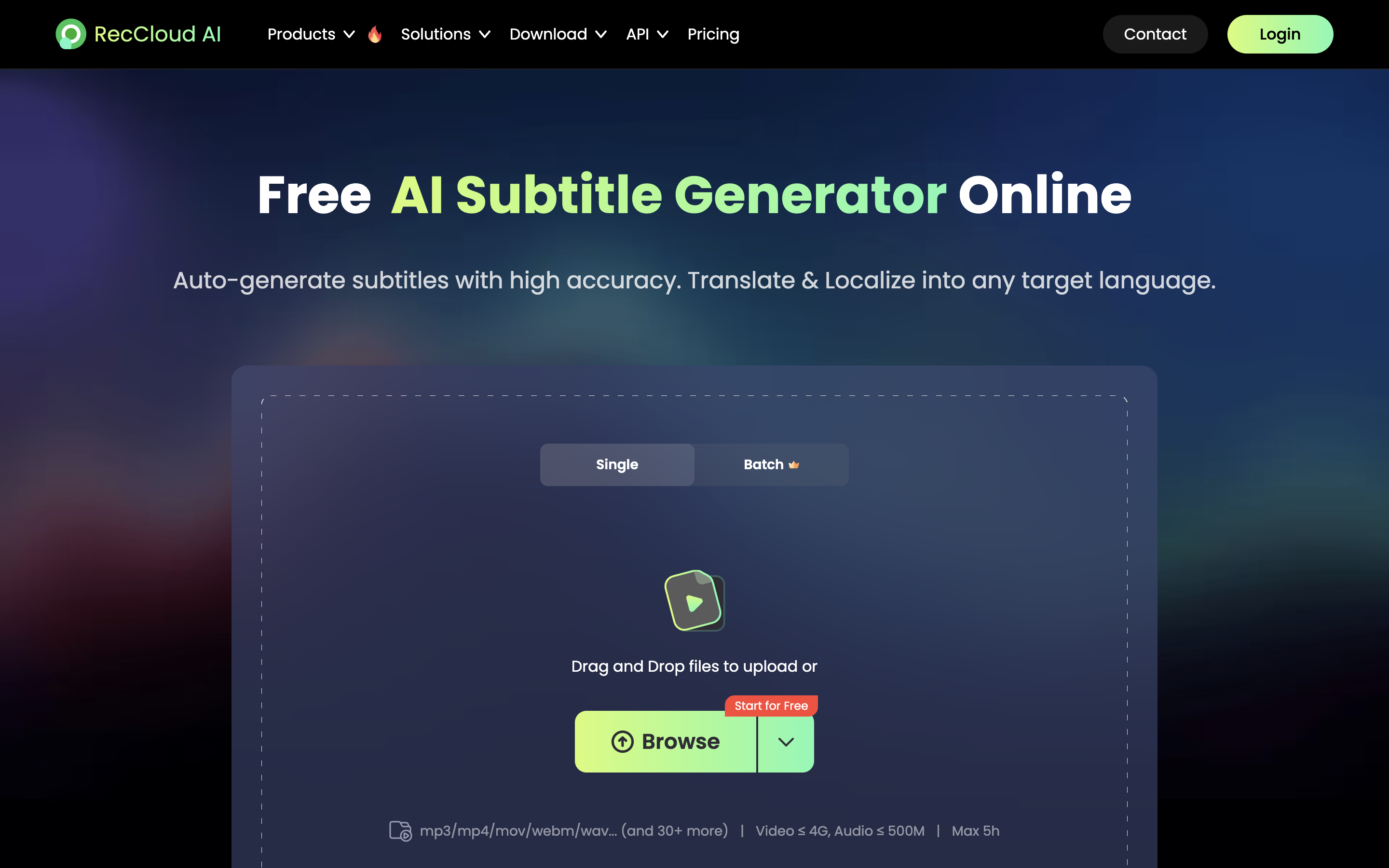
RecCloud describes a simple sequence: upload a video or audio file, generate subtitles, edit the text, timing, and style, then download the result. Its subtitle product page explicitly names two useful output paths: an SRT file and a video with captions burned in. That distinction matters. An SRT gives an editor or platform a separate caption file. A burned-in export puts the words into the picture and cannot be switched off by the viewer.
The same page says it supports speech detection in more than 100 languages and subtitle translation in more than 100 languages. Treat that as a feature-availability claim, not a guarantee that every language pair will need the same amount of cleanup. It also lists 30-plus formats, video files up to 4 GB, audio files up to 500 MB, and a five-hour maximum for its AI Subtitle Generator. A separate subtitle-translator page has a different three-hour limit, so do not merge those limits into one rule.
RecCloud's product page presents an upload, generate, edit, and download workflow.
The missing RecCloud price is a reason to pause, not guess
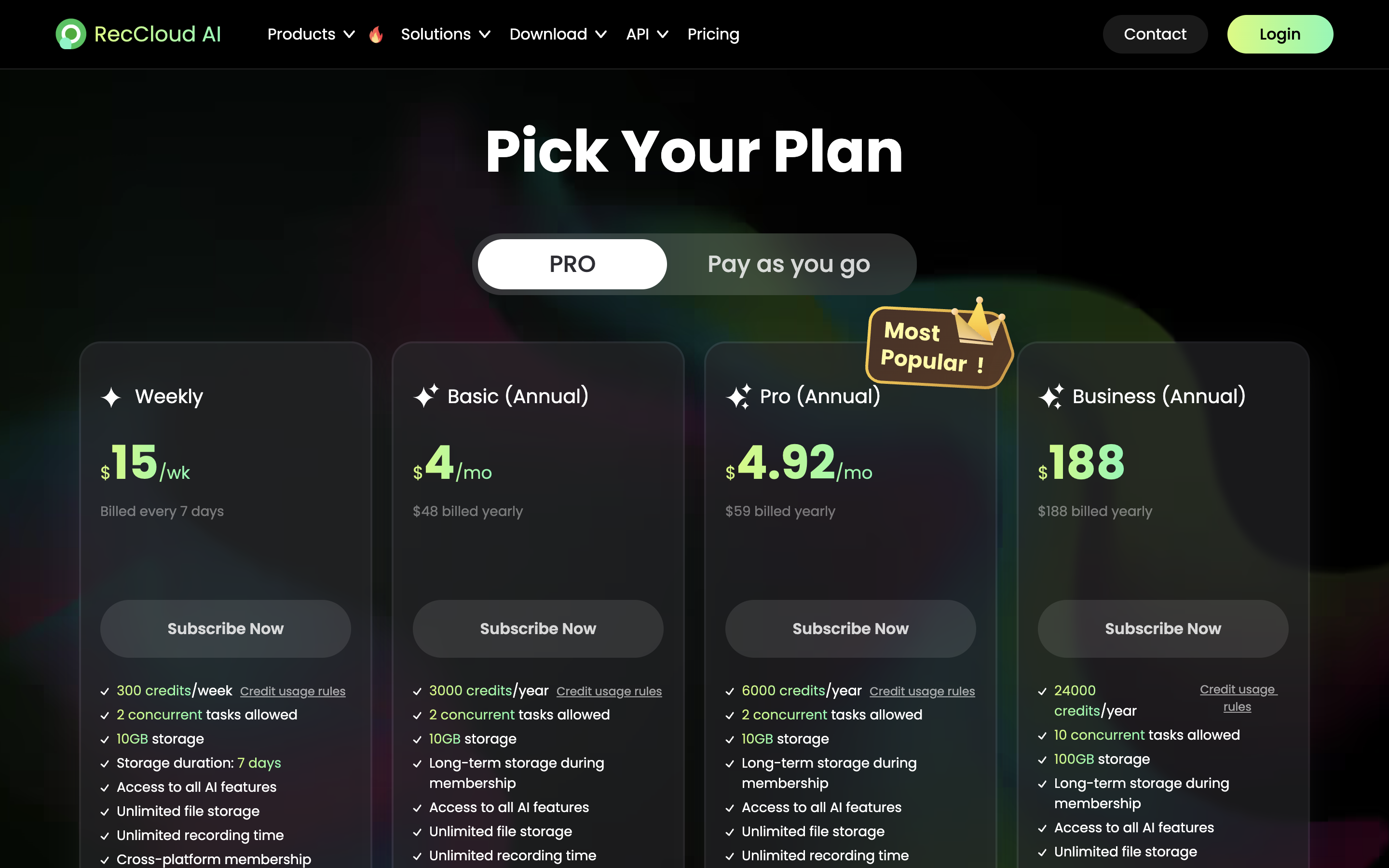
RecCloud's public pricing experience does not currently provide a stable, reader-safe set of plan prices and credit rules. The visible pricing information is dynamically rendered, and its page content includes inconsistent statements about subtitle usage and credit expiry. Its terms say current prices appear on the member payment page and can change. That is enough reason to avoid publishing a fixed monthly price, a universal free-minute allowance, or a credit-expiry promise here.
This is not a small detail if subtitles are part of a recurring production workflow. Before paying, check the logged-in plan page for the exact subtitle feature, included credits, expiry rule, and regional price. Screenshot the terms for the project if the work is for a client. A tool that looks inexpensive in a search snippet can become the costly option when every revision uses a separate credit balance.
Use the current account and checkout view to confirm price and credit terms before committing to a workflow.
Commercial use is the RecCloud decision point
RecCloud's subtitle generator is marketed for tutorials, promotional videos, ads, and e-learning. Its pricing FAQ adds a material condition: Basic and Pro are described as personal, non-commercial memberships, while Business is described as the plan that permits generated audio and video files to be used for profit and business purposes.
If the video earns ad revenue, promotes a paid product, belongs to a paid course, or is client work, do not assume a personal plan is sufficient because the export button is available. Confirm the current Business terms and make sure they cover the exact subtitle and translation workflow you use. Also retain rights to the source footage, voice, music, logos, and any material you upload. Caption software does not grant those rights.
RecCloud versus VEED: clarity versus an all-in-one workflow
VEED has a similar browser workflow: upload, generate or transcribe captions, select a language, edit, then export a captioned video or subtitle file. Its SRT tool names SRT, VTT, and TXT as subtitle-file outputs. VEED's subtitle translation page claims more than 125 languages.
The strongest reason to choose VEED is not that it will always caption better. It is that the plan-level free constraint is explicit. VEED's help center says Free exports are limited to 720p and have a watermark. A paid subscription is required for watermark-free export. The product page also says the free tier is a place to start, while longer videos and subtitle-file downloads require a paid plan.
That makes VEED useful for a creator who wants to evaluate the workflow with no ambiguity about what a free export will look like. It does not remove the need to check rights for uploaded media, stock material, or branded content.
RecCloud versus Descript: subtitles versus transcript-led editing
Descript begins from a different center of gravity. You import or record media, work with an automatic transcript, edit the recording through that text, and then create captions. Subtitle files can be exported as SRT or VTT, while burned captions are a separate video output.
Descript's pricing page lists 25 transcription languages. Korean is not in that transcription list. Korean does appear in the larger caption-translation and dubbing lists, but translation capability is not evidence of Korean-source automatic transcription. If your original audio is Korean, do not select Descript on the assumption that its automatic transcript is supported without checking the current documentation.
Its Free plan has a clear production limitation too: local video exports are listed as 720p and watermarked. Upgrading after an export does not remove an existing watermark from that already rendered file. The project must be exported again. For an English-language podcast or interview where editing words is the main task, that tradeoff may be worthwhile. For a straightforward subtitle pass, it may be unnecessary complexity.
Use a five-minute workflow test before choosing a plan
Pick a short source clip with two speakers, a proper noun, a number, a pause, and a cutaway. Run it through each candidate with the same source file. Then inspect the result in this order:
Can you correct the wording and timing without rebuilding captions from scratch?
Can you export the exact format the publishing platform needs: SRT, VTT, TXT, or burned captions?
Does the free plan allow that export without a watermark or resolution limit that breaks the project?
Are the plan's commercial rights clear for this video?
Does the language support apply to source transcription, subtitle translation, or both?
This test does not rank recognition models. It finds the operational limit that will stop your project after the demo looks good. Save the source file and repeat the same test when the tool changes its pricing or credits.
Frequently asked questions
Is RecCloud completely free?
No safe universal allowance can be stated from the public pages checked for this guide. RecCloud offers a free service and some feature-specific trials, but its subtitle pricing and credit information should be confirmed in the current account flow before you depend on it.
Can RecCloud create an SRT file?
Yes. Its AI Subtitle Generator says you can download captions as an SRT file or burn subtitles into the video. Choose SRT when the platform accepts an editable caption track.
Does RecCloud support commercial videos?
Its pricing FAQ says Business permits generated audio and video files to be used for profit and business purposes. Basic and Pro are described there as personal, non-commercial. Check the live terms before using the output for monetized or client work.
Does VEED Free add a watermark?
Yes. VEED's help center says Free exports are 720p and watermarked. Recheck the current plan before a paid campaign or client delivery.
Does Descript transcribe Korean audio?
Not according to the transcription-language list checked for this guide. Korean is shown for caption translation and dubbing, which are different features. Verify current support if Korean source audio is essential.
The practical choice
RecCloud is worth considering when you want a browser-based subtitle path from upload to SRT or captioned video, and you are prepared to validate its current Business terms for commercial use. VEED is easier to evaluate when the free-export limit needs to be explicit. Descript is the better fit when editing the transcript is the job, not simply producing captions.
Start with the same five-minute source clip. The tool that preserves a usable workflow, legal rights, and export path is more valuable than the one with the biggest language number on its landing page.
Features and policies were checked on 2026-09-17 and can change. This article contains an affiliate link. Fieldnotes may earn a commission if you sign up through it, at no added cost to you. No reader-only benefit was verified.
Explore the available options
Confirm the final price, eligibility, and refund terms on the seller page before purchasing.